- What Are Google Business Profile Categories? (And Why Most Businesses Get Them Wrong)
- Why Business Categories Are the Foundation of Local SEO Success
- How Google Business Profile Categories Directly Affect Your Google Maps Ranking
- How to Select the Appropriate Primary Category (5-Step Expert Process)
- How to Add Secondary Categories to Your Google Business Profile
- Best practices for secondary categories:
- How Many Categories Can You Add to Google Business Profile?
- Complete Google Business Profile Categories List (4,046 Categories Updated 2026)
- Most Popular Google Business Categories by Industry (2026 Edition)
- GMB Optimization Services
- GMB Reactivation & Suspension Recovery
- Video Verification Services
- GMB Help & Support Services
- Local SEO Services
- 6 Costly Google Business Profile Category Mistakes That Kill Your Local Rankings
- Even experienced business owners make these mistakes when choosing GBP categories:
- How to Change Your Google Business Profile Category (Without Hurting Your Rankings)
- How to change your primary or secondary category:
- What happens after you change categories:
- Final Thoughts: Your Category Is Your Local SEO Foundation
How Google Business Profile Categories Affect Google Maps Ranking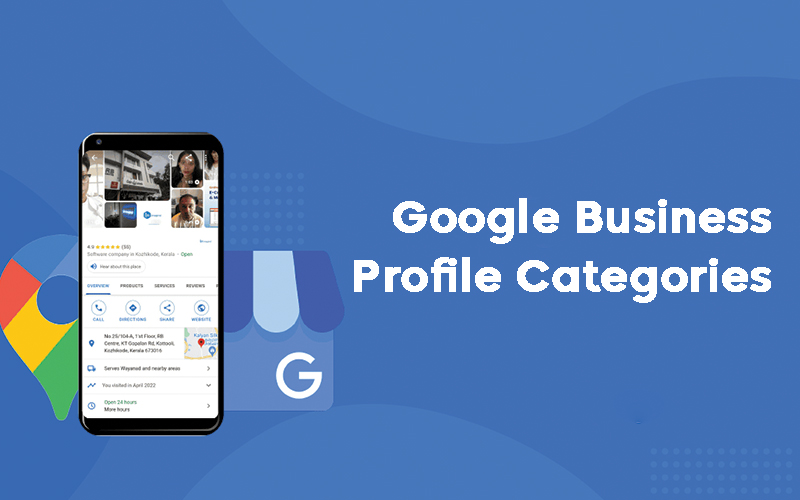
Have you ever used Google to search for an organization and noticed the term SEO Agency, Local SEO Service or Google Business Profile Manager listed next to their name? That is an instance of an Google Business Profile category in action. Selecting the most applicable category can help ensure maximum exposure of local businesses on search engines like Google.
This guide covers everything: what GBP categories are, why they matter, how to choose them correctly, and a breakdown of the most searched categories by industry in 2026. Whether you call it Google My Business categories or Google Business Profile categories, this complete Google My Business Category List will help you make the right choice for your business.
What Are Google Business Profile Categories? (And Why Most Businesses Get Them Wrong)
Google Business Profile (GBP) categories also known as Google My Business categories are predefined labels that describe what your business is and what it does. When you set up or manage your Google Business Profile, you must select at least one category and you can add up to nine more as secondary categories.
These categories are not something you can make up yourself. Google maintains an official list of over 4,000 categories, updated regularly to reflect changes in industries and market trends. As of early 2026, there are approximately 4,046 active GBP categories.
The key rule Google follows here: your category should describe what your business IS, not what it HAS. An SEO agency IS an SEO agency it cannot claim to be a software company simply because it uses SEO tools.
Why Business Categories Are the Foundation of Local SEO Success
Google Business Profile categories are arguably the single most important field in your entire profile for local SEO. Here’s why:
They determine where your business shows up. When someone searches Google Business Profile management near me or GBP suspension recovery service, Google uses your primary category to decide whether your business is a relevant result.
They unlock special profile features. Certain categories give you access to exclusive GBP features. For example, service-based businesses like local SEO agencies get booking integrations, appointment buttons, and service menus directly on their profile. Without the right category, these features simply don’t appear.
They influence your Local Pack ranking. The Local Pack those three map results that appear at the top of Google Search are heavily filtered by category relevance. If your category doesn’t match the search intent, you won’t appear in it, regardless of how many reviews you have or how optimized your profile is.
They shape how customers find you. Categories affect which searches trigger your profile, how Google’s algorithm understands your business, and ultimately how many potential customers discover you each month.
How Google Business Profile Categories Directly Affect Your Google Maps Ranking
To fully grasp rankings, it's necessary to gain an understanding of how Google evaluates local search results. Google uses three main criteria when conducting its evaluation: relevance, distance and prominence.
Your GBP category directly impacts relevance which is Google’s way of asking, Does this business match what the user is searching for?
When your primary category precisely matches a user’s search intent, Google is far more likely to show your profile. Studies in local SEO have consistently shown that businesses with accurately chosen primary categories outperform competitors with vague or incorrect categories, even when those competitors have more reviews or better overall profiles.
Secondary categories also contribute to ranking, but in a different way. They help your business appear in related searches that are connected to but not identical to your core offering. For example, a local SEO agency that also handles GBP suspension recovery benefits from having both Marketing Agency and SEO Agency as categories capturing both optimization and recovery-related searches.
One important thing to note: stuffing your profile with unrelated or loosely related categories can actually hurt your ranking. Google’s algorithm is sophisticated enough to detect category mismatches, and over-categorization can trigger quality issues or, in severe cases, profile suspension.
How to Select the Appropriate Primary Category (5-Step Expert Process)
Your primary category carries the most ranking weight, so choosing it correctly is critical. Follow this process:
Step 1 — Define your core business offering. Ask yourself: if someone had to describe your business in two or three words, what would they say? That answer usually points directly to your primary category.
Step 2 — Google offers several search options for discovering what type of categories Google trusts for your type of business. Check Google Maps and use a keyword search of your category keyword; observe the top-ranking businesses to see their primary categories being used - this competitor analysis shows which Google-trusted categories may work well for your industry.
Step 3 — Choose specific over generic. SEO Agency will almost always outperform Marketing Agency as a primary category for local SEO searches, because it more precisely matches the intent of people looking for search optimization services. The more specific your category, the more relevant traffic you attract.
Step 4 — Verify your category exists in GBP. Not every category you think should exist actually does. Always select from Google’s official list inside your GBP dashboard. If your ideal category isn’t there, choose the closest match and use secondary categories to add nuance.
Step 5 — Align with profitability. Your primary category should reflect your most profitable service, not necessarily your broadest one. If 80% of your revenue comes from GBP suspension recovery but you also do general GMB optimization, make your primary category reflect the recovery service you are best known for.
How to Add Secondary Categories to Your Google Business Profile
Secondary categories allow you to tell Google about the full scope of your services without diluting your primary identity. Here’s how to add them:
- Log into your Google Business Profile at business.google.com
- Select Edit My Profile in order to edit.
- Navigate to the Business category section
- To add or change existing categories, right-click and choose Create New Category.
- Type in your desired category and select from the drop-down suggestions
- Save Your Changes
You can add up to 9 secondary categories, giving you a total of 10 categories across your profile.
Best practices for secondary categories:
- Only add categories that accurately reflect real services you provide
- Don’t add categories just because competitors have them add them because you genuinely offer those services
- Review your secondary categories every six months, as Google updates its category list regularly
- Prioritize secondary categories by revenue potential put your second-most-profitable service first
How Many Categories Can You Add to Google Business Profile?
You can add a maximum of 10 categories in total 1 primary category and up to 9 secondary categories. However, most local SEO experts recommend keeping your total to between 3 and 5 categories. More is not always better.
Adding too many categories, especially unrelated ones, can confuse Google’s algorithm about what your business actually does, dilute your ranking strength for your core category, and in some cases, trigger a Google Business Profile suspension for quality policy violations.
The best approach: use only the categories that genuinely and accurately describe your business.
Complete Google Business Profile Categories List (4,046 Categories Updated 2026)
Google full list contains over 4,000 categories and is updated monthly. Below is a curated breakdown of the most commonly used and searched categories across major industries in 2026.
For the full official list, you can access the complete category database through tools like PlePer’s GBP Category Tool or Dalton Luka’s category guide, both of which sync directly with Google’s live category data.
Most Popular Google Business Categories by Industry (2026 Edition)
Selecting the right category from Google’s list of 4,046+ options can feel overwhelming. To make it easier, here is a professionally curated breakdown of the most searched and high-performing Google My Business categories specifically for businesses that manage, optimize, or recover Google Business Profiles.
GMB Optimization Services
Profile optimization is the foundation of every successful local SEO strategy. Choosing the right GBP category ensures your optimization efforts actually reach the customers who are searching for you.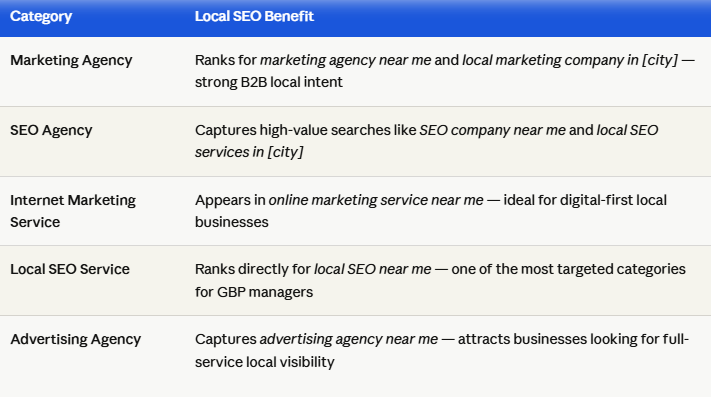
GMB Reactivation & Suspension Recovery
Suspension recovery is one of the highest-intent service searches in the local SEO space. Business owners searching for help are ready to act immediately the right category puts you directly in front of them.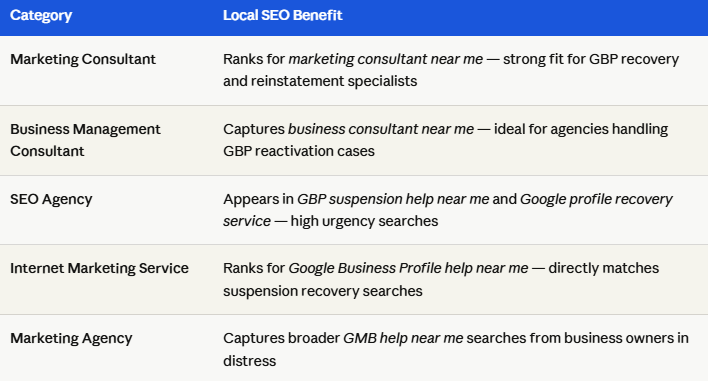
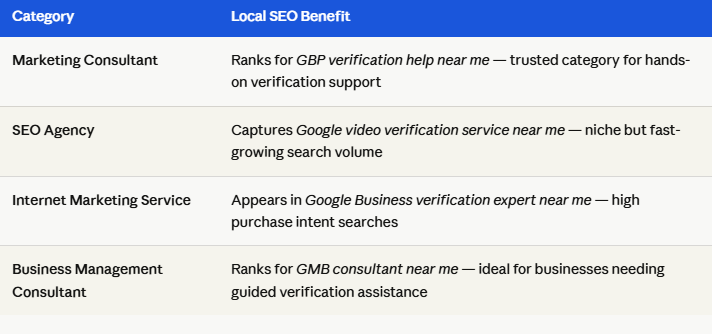
Video Verification Services
Video verification is a growing GBP requirement in 2026. Businesses searching for verification help have very specific and urgent needs your category must match that intent precisely.
GMB Help & Support Services
Businesses looking for ongoing GMB support need experts they can trust. The right category makes your support service discoverable at exactly the moment a business owner needs help.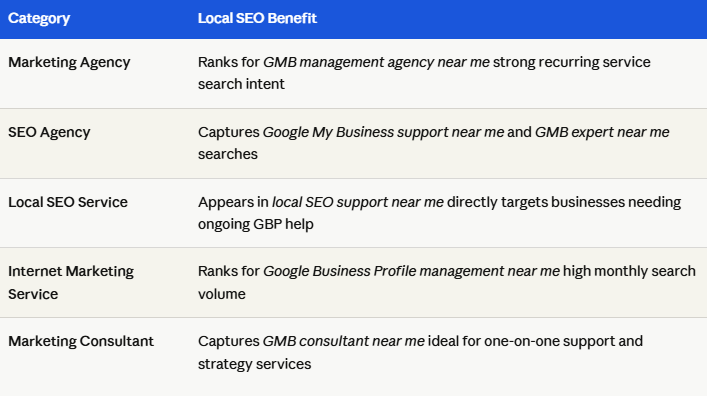
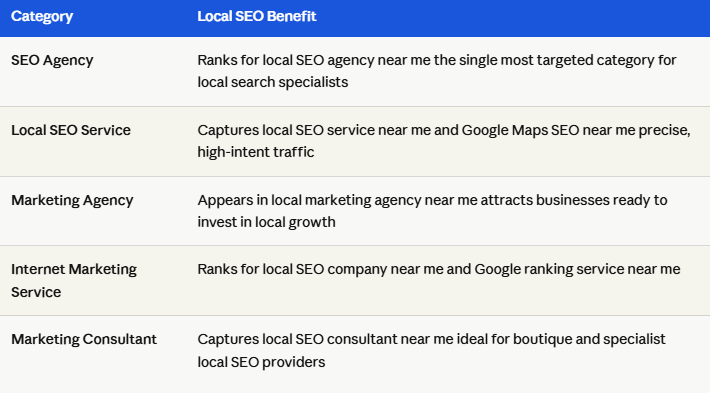
Local SEO Services
Local SEO is the umbrella service that ties everything together. Businesses searching for local SEO help are actively looking to improve their Google Maps visibility and the right GBP category ensures you show up first.
6 Costly Google Business Profile Category Mistakes That Kill Your Local Rankings
Even experienced business owners make these mistakes when choosing GBP categories:
Mistake 1 — Choosing a broad category instead of a specific one. Selecting a Marketing Agency when your core service is local SEO means you are competing with thousands of unrelated agencies. A more specific category like SEO Agency attracts far more relevant local search traffic.
Mistake 2 — Choosing based on assumption, not search behavior. You might think Digital Marketing Company sounds professional, but if your clients are searching for Google Business Profile management near me, your category needs to reflect that exact intent, not your preferred label.
Mistake 3 — Adding categories for services you don’t actually provide. This is a direct Google policy violation and one of the most common reasons GBP profiles get suspended. Only add categories that match real services you actively offer.
Mistake 4 — Ignoring the category list after setup. Google adds and removes categories frequently. A category that didn’t exist six months ago might be a perfect fit for your local SEO or GBP management service today. Audit your categories at least twice a year.
Mistake 5 — Using a category that doesn’t match your primary service. If your main revenue comes from GBP suspension recovery but your primary category is set to Advertising Agency, you are missing all the high-intent searches from business owners looking specifically for suspension help.
Mistake 6 — Copying competitors blindly. If a top-ranking local SEO agency uses a certain category, investigate before copying their category strategy may be optimized for a different city, service mix, or client type than yours.
How to Change Your Google Business Profile Category (Without Hurting Your Rankings)
Changing your GBP category is straightforward, but there are a few things to be aware of before you do it.
How to change your primary or secondary category:
1. Go to business.google.com and sign in
2. Select your business profile
3. Click Edit profile
4. Click on the business category field
5. Remove the old category and select the new one from the dropdown
6. Click Save
What happens after you change categories:
Your profile may require re-verification. Google sometimes triggers a re-verification request when significant changes are made to a profile, particularly when the primary category changes dramatically (e.g., from Marketing Agency to SEO Agency). This is normal.
Your ranking for the old category will drop. This is expected and intentional you’re now optimizing for different search terms.
Your ranking for the new category will improve over time, typically within 2 to 4 weeks, as Google reindexes your profile under the updated classification.
Do not change your primary category frequently. Rapid, repeated changes send inconsistency signals to Google and can temporarily suppress your local rankings.
Final Thoughts: Your Category Is Your Local SEO Foundation
Your Google Business Profile category is not a minor detail, it is the foundation of your local SEO strategy. It determines which customers find you, which features you can access, and how competitive you are in your local market.
Take the time to research your primary category carefully, add secondary categories that reflect your actual service offerings, and revisit your selection every six months as Google’s category list evolves.
If your GBP profile is underperforming or if you need help navigating a suspension caused by category violations, GMB Guru’s team of local SEO specialists is here to help. We’ve helped hundreds of businesses recover visibility, optimize their profiles, and dominate local search results.
Get expert help with your Google Business Profile today.