- What Is Google Business Profile (GMB / GBP)?
- Why Local SEO Starts at the Listing Stage, Not After
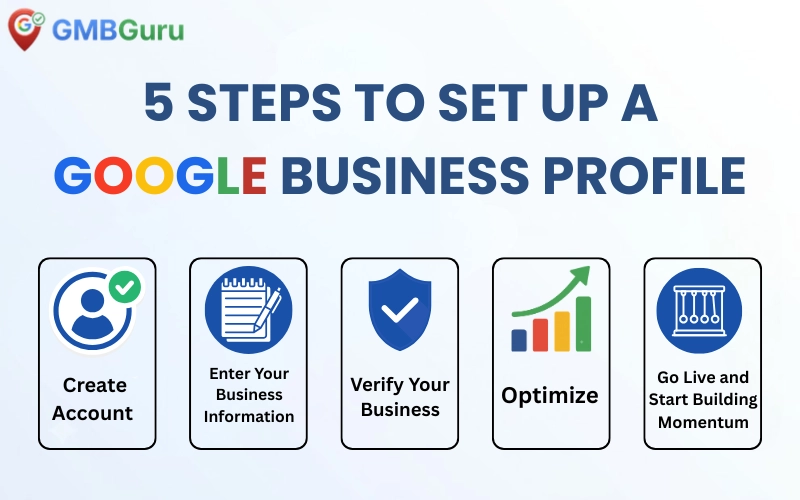
- Step 1: Create Your Google Business Profile (GBP) Account
- Step 2: Enter Your Business Information
- Step 3: Verify Your Business
- Step 4: Optimize Your Profile Before Going Live
- Step 5: Go Live and Start Building Momentum
- Common Mistakes That Get New Listings Rejected or Suspended
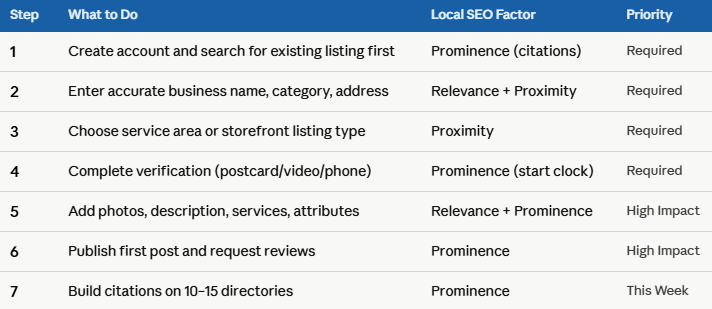
- Listing Checklist at a Glance
How to List Your Business on Google Maps (GMB / GBP) — Step-by-Step Guide 2026
 If your business isn't on Google Maps, you're invisible to nearly half of all Google searches. Google reports that 46% of all searches have local intent meaning people are actively looking for a business near me, in their city, or in their neighborhood. If you're not listed, every one of those searches goes to your competitor instead.
The good news is that listing your business on Google Business Profile, commonly known as GMB or GBP, is completely free and can be done correctly in under 30 minutes if you follow the right process. The bad news is that most businesses get at least one step wrong, wrong category, incomplete information, or a failed verification attempt and end up delayed, rejected, or even suspended before they ever go live.
This guide walks you through the entire process from start to finish, covering everything Google actually checks before approving your listing, plus the optimization steps that determine whether you show up in the Local 3-Pack or get buried on page two of Maps results.
What Is Google Business Profile (GMB / GBP)?
Google Business Profile often shortened to GBP, and formerly called Google My Business (GMB) is the free tool that lets your business appear on Google Maps and in local search results. Throughout this guide, you'll see both GMB and GBP used, since Google officially renamed the product to Google Business Profile, but most people still search using the older GMB term.
Once listed, customers can find your address, hours, phone number, reviews, and photos directly from a Google search, without ever visiting your website. But here's what most beginners miss: the way you fill out your listing directly feeds into the three Local SEO ranking factors Google uses to decide where you appear Proximity (how close you are to the searcher), Relevance (how well your profile matches the search), and Prominence (how trusted and well-reviewed you are). Every step in this guide ties back to one or more of these factors.
Listing your GBP correctly is the foundation of local SEO. Get it wrong, and you risk delays, rejection, or even suspension. Get it right, and you open the door to the Local 3-Pack the top 3 business results Google shows for local searches.
Why Local SEO Starts at the Listing Stage, Not After
Most business owners think Local SEO is something you do after your listing goes live adding posts, collecting reviews, and building links. In reality, the decisions you make while listing your business already set your Local SEO ceiling.
For example, your Proximity score depends partly on whether you correctly set your service area or your exact pin location during signup. If a plumber serving three counties only lists a single point address with no service area defined, Google has no way to know they're relevant for searches in the neighboring towns. Proximity signals are wasted before the business even goes live.
 Step 1: Create Your Google Business Profile (GBP) Account
Go to google.com/business and sign in with a Google account. This is where you'll set up your GBP, sometimes still called GMB out of habit. Use a dedicated business email rather than a personal one that matters later if you ever transfer ownership or add managers.
- Click Manage now and enter your exact, legal business name with no extra keywords or location names added to it.
- Search to confirm your business doesn't already have an unclaimed listing on Google Maps before creating a new one.
- If a listing already exists, claim it instead of creating a duplicate.
Local SEO Tip — Citations Start Here: The business name you enter at this step becomes your NAP (Name, Address, Phone) record the exact data point Google cross-references against every other citation of your business across the web (Yelp, Facebook, Bing, industry directories). If your GBP name doesn't match your signage, website, or other directory listings exactly, your Prominence signal weakens because Google can't confidently confirm it's the same business everywhere. Decide on one consistent name format now, before you list it anywhere else.
Step 2: Enter Your Business Information
This is the most important step for long-term ranking. Every field you fill in becomes a ranking signal.
- Business category — choose the most specific category that matches what you do (e.g., Local Seo not just SEO).
- Location — select whether customers visit you at your address, or whether you visit customers (service-area business). Service-area businesses can hide their exact address.
- Service areas — if applicable, list every city or region you serve, up to 20 areas.
- Phone number and website — use a local number where possible and link to your actual website, not a generic landing page.
- Business hours — keep these accurate and update them for holidays. Incorrect hours hurt customer trust and your ranking.
Local SEO Tip — Proximity: If you're a service-area business offering GMB management or local SEO services to clients in multiple cities, the service area field is your single biggest Proximity lever. An agency that only sets its office address as the location, without listing the surrounding cities it actually serves clients in, will struggle to appear in Maps results for GMB management services near me outside its immediate radius. Listing every city you genuinely serve tells Google's Proximity algorithm where else to surface you.
Local SEO Tip — Relevance: Category selection is the strongest Relevance signal in the entire profile. A business offering Google Business Profile services that picks the generic Marketing Agency category instead of Internet Marketing Service or Search Engine Optimization Service is telling Google it's relevant for everything and nothing in particular. Be as specific as the dropdown allows, and add secondary categories for every real service line you offer such as GMB Verification, GMB Optimization, or GMB Suspension Recovery since each one expands the exact-match searches your profile can win.
Step 3: Verify Your Business
Verification proves to Google that your business is real and located where you say it is. In 2026, Google has expanded verification methods, and many new listings are now required to complete video verification.
- Postcard verification — Google mails a postcard with a code to your business address, usually within 5 business days.
- Phone or email verification — available for some eligible businesses, offering instant verification.
- Video verification — you record a short walkthrough video of your location, signage, and proof of operation, guided by Google's in-app instructions.
Local SEO Tip — Prominence Starts the Clock: Until your listing is verified, Google does not count any activity toward your Prominence score no reviews, no engagement, no citations cross-check. A failed or delayed verification means a delayed start to your entire Local SEO timeline. This is why getting the video verification right the first time matters more than it seems: every week lost to a rejected verification is a week your competitors spend collecting reviews and building citations while you're still invisible.
Important: Failed video verification is now one of the top reasons new listings don't go live. Poor lighting, missing signage, or a mismatched address in the video are the most common rejection reasons.
Step 4: Optimize Your Profile Before Going Live
Once verified, don't stop. An incomplete profile ranks far below a fully optimized one for the exact same business type and location.
- Upload a logo, cover photo, and at least 10 real photos of your location, team, and products.
- Write a complete business description using natural language and your core services.
- List all your products and services individually, with descriptions and prices where possible.
- Add relevant attributes
- Publish your first Google Post to show the profile is active and managed.
Local SEO Tip — Relevance Through Content: Every service you list individually, rather than bundling into one vague line, becomes a separate Relevance match point. A GMB agency that lists GMB Verification, GMB Suspension Recovery, and Google Maps Ranking Optimization as three distinct services will be matched for three distinct sets of searches. Listing just GMB Services as one item means Google has to guess at the rest.
Local SEO Tip — Prominence Through Photos: Photo count and freshness are direct Prominence inputs Google's algorithm measures. Profiles Optimization with 100+ photos consistently receive more direction requests and website clicks than those with under 10 not because photos are decorative, but because Google treats active photo uploads as evidence of a real, currently-operating business, which feeds directly into your Prominence and trust score.
Step 5: Go Live and Start Building Momentum
Once your listing is verified and live, the real work of ranking begins.
- Ask your first few customers for Google reviews; this builds initial trust signals quickly.
- Respond to every review and message promptly to show Google your profile is actively managed.
- Post weekly updates, offers, or events to keep the profile active.
- Check the Performance tab monthly to track views, calls, and direction requests.
Local SEO Tip — Review Velocity Over Review Count: A steady flow of 1-2 new reviews per week builds Prominence more reliably than a single burst of 50 reviews collected in one day and then nothing for months. Google's algorithm reads consistent review velocity as a sign of an active, trustworthy, ongoing business which is exactly what the Prominence factor is designed to measure. Set up a simple review-request habit (a text or email after every job) rather than a one-time push.
Common Mistakes That Get New Listings Rejected or Suspended
- Keyword stuffing the business name — adding extra location or service keywords violates Google's guidelines and actively damages Relevance trust signals rather than helping them.
- Using a virtual office or unstaffed address — Google's verification team checks physical presence, and a fake address destroys your Proximity accuracy along with risking suspension.
- Creating a duplicate listing — always search and claim an existing listing first; duplicates split your review history and Prominence signals across two profiles instead of consolidating them.
- Choosing the wrong category — too broad a category limits your visibility for specific searches and weakens Relevance from day one.
- Skipping video verification prep — not having clear signage or address proof ready causes failed attempts and delays the start of your Prominence-building timeline.
- Inconsistent NAP across the web — even small formatting differences (e.g., St. vs. Stree) between your GBP and other directory citations confuse Google's Prominence calculations.