- What Is a Duplicate Google Business Profile?
- Why Duplicate Listings Are More Dangerous Than You Think
- Your Reviews Get Split in Half
- Your Local Search Rankings Tank
- You're One Algorithm Update Away from Suspension
- How to Find Your Duplicate Google Business Profile
- Step 1: Search Google Maps Directly
- Step 2: Check Your Google Business Profile Manager
- Step 3: Use Third-Party Audit Tools
- How to Merge Duplicate Google Business Profiles: Step-by-Step
- Step 1: Claim Both Listings
- Step 2: Identify the Primary Listing
- Step 3: Report the Duplicate to Google
- Step 4: Fix Your NAP Consistency Everywhere
- How GMB Guru Handles Duplicate GBP Listings for Clients
- What If Your Listing Gets Suspended During This Process?
- Special Cases: When Merging Isn't the Right Answer
- How to Prevent Duplicate GBP Listings in the Future
- Don't Let a Duplicate GBP Kill Your Local Rankings
How to Merge Duplicate Google Business Profiles (And Why It's Hurting Your Rankings)
 You search for your own business on Google Maps and something unsettling stares back at you: two listings. Same address, same phone number, maybe even the same business name — but two completely separate Google Business Profiles floating out there in the wild. This is the duplicate GBP problem, and it's more damaging than most business owners realize. Google doesn't reward confusion. Duplicate listings split your review equity, dilute your local search signals, and can trigger a profile suspension that takes your business off Maps entirely. If you've discovered you have a duplicate Google business listing — or you suspect you might — this guide walks you through exactly what's happening, why it matters, and how to fix it the right way. And if you'd rather have a certified expert handle it without the risk, our team at GMB Guru does this every week for businesses across the United States.
What Is a Duplicate Google Business Profile?
A duplicate GBP (Google Business Profile) is any situation where two or more listings on Google Maps represent the same physical business location. This can happen in more ways than most people expect:
- Old unclaimed listings: A previous owner or Google's automated data crawlers created a listing years ago that was never claimed — and then you (or someone on your team) created a brand-new one.
- Multiple verified profiles: Two different people at your company both went through verification at different times, creating two fully live listings.
- Business name or address variations: A slight difference in the business name or a suite number discrepancy caused Google's system to treat them as separate locations.
- Rebrand or relocation leftovers: Your business moved or changed its name, but the old listing was never properly closed or merged.
- Data aggregator imports: Third-party data providers like Acxiom or Infogroup pushed your business data into Google's index independently of your own GBP, creating a ghost listing you didn't even know existed.
According to Google's own guidelines, each business location should have one and only one verified listing. Any deviation from that is a policy violation — and Google's algorithm actively deprioritizes businesses with conflicting or duplicate signals. That means if you have a duplicate google business listing sitting out there, it's actively costing you ranking positions every single day.
Why Duplicate Listings Are More Dangerous Than You Think
It's tempting to think, "Well, at least I have two chances to show up." That logic is wrong, and understanding why is critical to appreciating the urgency of this fix.
Your Reviews Get Split in Half
Reviews are one of the most powerful local ranking signals on Google. When you have two listings, customers leave reviews on whichever one they find first. That means your hard-earned social proof gets divided between two profiles. A business with 80 reviews on one listing and 35 on another looks far weaker than a competitor with 115 consolidated reviews on a single, authoritative profile. Merged listings can consolidate that review history — and the ranking boost that comes with it.
Your Local Search Rankings Tank
Google's local ranking algorithm — which weighs relevance, distance, and prominence — gets confused when it sees conflicting signals from two listings. Instead of doubling your visibility, duplicate listings actually suppress both. NAP inconsistency (Name, Address, Phone) across duplicates also undermines your broader local SEO authority, affecting not just Maps but organic search results too.
You're One Algorithm Update Away from Suspension
Google actively scans for duplicate and spammy listings. If their automated system flags your business as having duplicate profiles, you could face a listing suspension — meaning your business disappears from Google Maps entirely. We've helped dozens of clients at GMB Guru who didn't even realize their duplicate was the root cause of their suspension. If you want to understand the full risk landscape around suspensions, our post on why Google Business Profiles get suspended covers this in detail.
How to Find Your Duplicate Google Business Profile
Before you can fix the problem, you need to confirm it exists and identify which listing is the "primary" one worth keeping.
Step 1: Search Google Maps Directly
Open Google Maps and search for your exact business name, then your business name plus your city. Look carefully at the results — sometimes duplicates appear right next to each other, and sometimes they appear in different zoom levels or with slightly different name variations. Try searching your phone number as well, since Google Maps will often surface listings tied to that number.
Step 2: Check Your Google Business Profile Manager
Log in to business.google.com and look at every listing associated with your account. If you see two entries for the same location, you've confirmed the duplicate. Also check whether either listing shows as "unverified" or "pending" — that status is important for the merge process.
Step 3: Use Third-Party Audit Tools
Tools like BrightLocal, Moz Local, or Semrush's listing management feature can surface duplicate and inconsistent citations across the web, including Google. Running a citation audit is something our team does as part of every GBP optimization engagement at GMB Guru — because duplicates are almost always a symptom of broader NAP inconsistency across the web.
How to Merge Duplicate Google Business Profiles: Step-by-Step
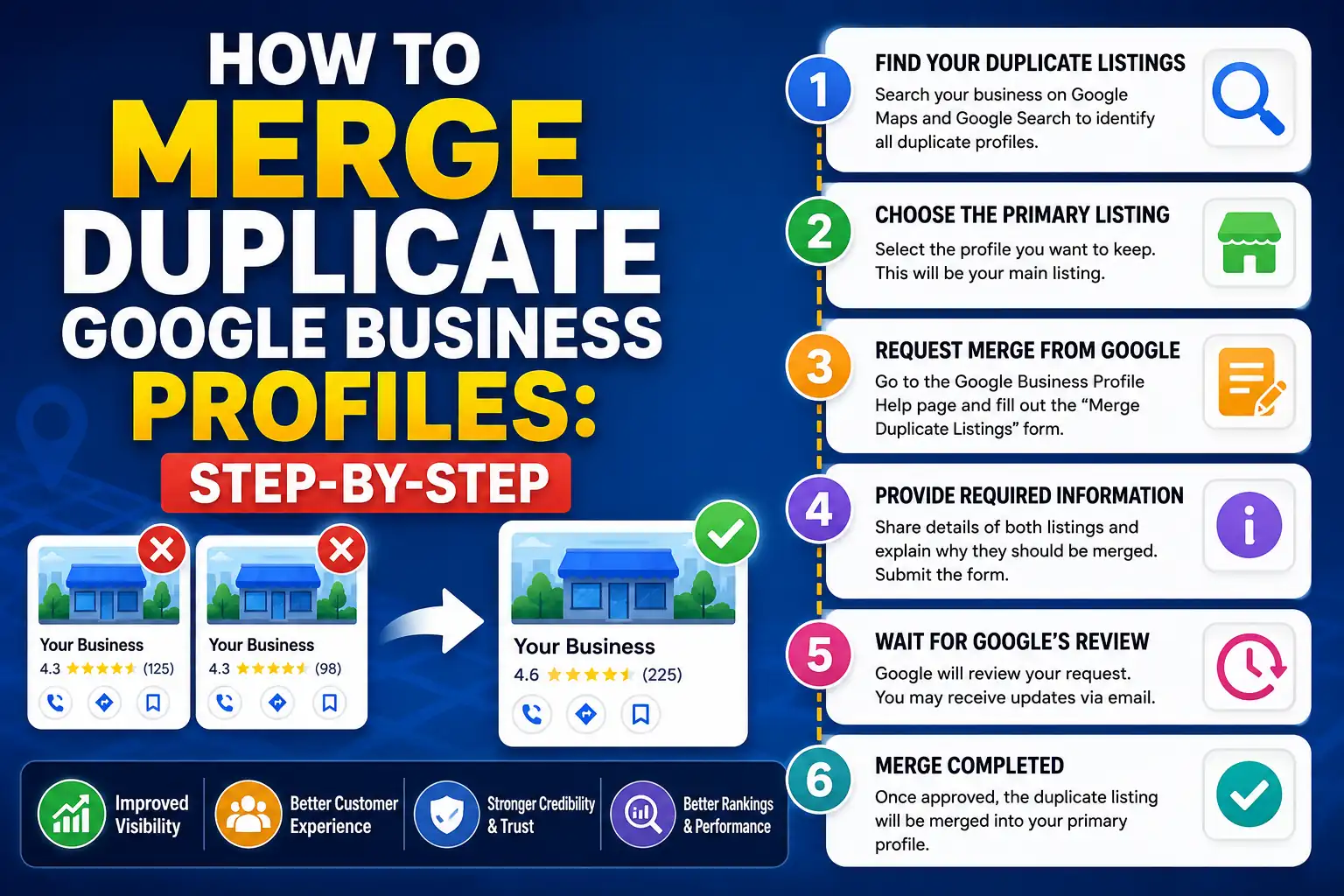 Step 1: Claim Both Listings
Google will only allow you to request a merge if you have ownership or management access to both listings. If one of the duplicates is unclaimed, go through the standard claim and verification process before proceeding. Our team can handle the verification step too — including video verification, which is now the most common verification method Google requires. See our Google Business video verification service if you're stuck on this step.
Step 2: Identify the Primary Listing
Your primary listing should be the one that:
- Has the most reviews and the highest review rating
- Has been active the longest
- Has the most accurate and complete business information
- Is currently verified
This is the listing you'll keep. The other one will be reported as a duplicate and ultimately merged into or removed in favor of the primary.
Step 3: Report the Duplicate to Google
Here's where most business owners get frustrated. Google does not have a one-click "merge listings" button in the Business Profile Manager dashboard. The actual process involves:
- Option A — Suggest an edit: On the duplicate listing in Google Maps, click "Suggest an edit," then select "Close or remove this place" and choose "Duplicate of another place." You'll be prompted to identify the correct listing. This works for unverified or low-authority duplicates but can take weeks.
- Option B — Contact Google Support directly: For verified duplicates, you need to open a support case through the Google Business Profile help center and explicitly request a merge. You'll need to provide the names, addresses, and CID numbers (Google's internal listing identifier) for both listings.
- Option C — Use the Business Profile Manager bulk tools: If your business has multiple locations and is enrolled in Business Profile Manager's location group, there are additional tools available for managing and flagging duplicates at scale.
Important: Google will not automatically merge reviews from the duplicate into your primary listing. In most cases, the duplicate is simply removed. This is why identifying and protecting the stronger listing before initiating the merge is so critical.
Step 4: Fix Your NAP Consistency Everywhere
Merging the duplicate listings on Google is only half the battle. If your Name, Address, and Phone number are inconsistent across directories like Yelp, Apple Maps, Bing Places, and industry-specific sites, Google's algorithm will keep generating confusion — and potentially recreate the duplicate problem over time. A full citation audit and cleanup is essential after any merge. Our local SEO services include ongoing citation management to prevent this from happening again.
How GMB Guru Handles Duplicate GBP Listings for Clients
We want to be straightforward with you: the duplicate GBP merge process sounds simple on paper, but in practice it involves a lot of waiting, a lot of back-and-forth with Google Support, and a real risk of losing your review history or accidentally triggering a suspension if handled incorrectly. Our clients come to us specifically because they tried to do this themselves and either couldn't get a resolution from Google or made the problem worse.
Here's what our process looks like when a client comes to us with a duplicate listing problem:
- Audit Phase: We conduct a full GBP audit across both listings — comparing review counts, verification status, activity history, and NAP consistency — to determine which listing is the authoritative primary. We also check for any existing policy violations that might complicate the merge.
- Ownership Verification: We confirm access to both listings and, if necessary, initiate a claim or verification process on the unowned duplicate. This often involves Google's new video verification workflow, which our team is certified to guide clients through.
- Support Case Filing: We open a formal Google Business Profile support case with a documented merge request, including CID numbers, screenshot evidence, and a clear explanation of the duplicate situation. We follow up proactively — because Google Support doesn't always act quickly without a nudge.
- Post-Merge Optimization: Once the duplicate is resolved, we fully optimize the surviving listing — categories, attributes, photos, services, posts, and Q&A — to maximize its ranking potential. You can see what that full optimization process looks like on our Google Business Profile optimization services page.
- Citation Cleanup: We audit your NAP data across the top 50+ citation sources and correct any inconsistencies that could cause the duplicate problem to resurface.
The whole process typically takes 2–4 weeks from start to finish, depending on Google's response time. Our clients consistently come out the other side with a single, strong, fully optimized listing that ranks better than either of the duplicates did individually.
What If Your Listing Gets Suspended During This Process?
It happens. Sometimes the act of reporting a duplicate or claiming an unclaimed listing triggers Google's spam detection system, and your primary listing gets caught in the crossfire. If your profile disappears from Maps or shows a suspension notice, don't panic — but do act quickly. Our Google Business Profile suspension recovery service is specifically designed for situations like this. We've successfully reinstated hundreds of profiles, including many that were suspended as a side effect of a duplicate listing situation. You can also learn more about the recovery process in our guide on what to do when your Google Business Profile gets suspended.
Special Cases: When Merging Isn't the Right Answer
Not every duplicate situation calls for a standard merge. Here are a few scenarios where the approach is different:
- Multiple legitimate locations: If your business genuinely has two separate physical locations — even very close to each other — they should have separate listings. The problem only exists when one location has two listings.
- Service-area businesses: If you're a service-area business (SAB) without a public-facing storefront, Google has specific rules about how your listing should be set up. Having a duplicate SAB listing is still a problem, but the merge process is slightly different.
- Practitioner listings: In industries like healthcare, law, and real estate, individual practitioners often have their own GBP listings alongside the business listing. These are not duplicates — they're intentional and allowed under Google's guidelines.
- Rebranded businesses: If your business changed its name, the old listing shouldn't be merged — it should be updated with the new name on the same listing, not abandoned to create a ghost profile.
How to Prevent Duplicate GBP Listings in the Future
Once you've resolved your current duplicate situation, here's how to make sure it doesn't happen again:
- Claim every listing associated with your business — even old, inactive ones — so no one else can create a duplicate by claiming them.
- Maintain strict NAP consistency across all directories, your website, and your social profiles. Even small variations (like "St." vs. "Street") can confuse Google's aggregation algorithms.
- Monitor your GBP regularly — at least weekly — for unauthorized edits, new duplicate suggestions, or status changes. Google allows anyone to "suggest an edit" on your listing, including competitors.
- Designate one owner and one manager for your GBP account, with clear internal documentation. Well-meaning team members creating "new" listings because they couldn't find the original is one of the most common causes of duplicates we see.
- Work with a GBP management partner who monitors your listing health on an ongoing basis. Our GMB help and support service includes proactive monitoring so duplicate listings are caught and flagged before they do real damage.
For a full checklist of everything your Google Business Profile needs to perform at its best, our GMB optimization checklist for 2026 is a great next read.
Don't Let a Duplicate GBP Kill Your Local Rankings
Duplicate Google Business listings are a silent killer of local SEO performance. They split your reviews, confuse Google's algorithm, and put you at risk of suspension — all while a cleaner, smarter competitor inches up the Maps rankings above you. The fix is achievable, but it requires knowing exactly which steps to take, in which order, with documentation Google will actually act on.
At GMB Guru, we've resolved duplicate GBP situations for businesses in nearly every industry across the US — from single-location restaurants to multi-location service companies. We know how to communicate with Google Support effectively, how to protect your review history during a merge, and how to come out the other side with a listing that's optimized to rank. If you're dealing with a duplicate listing — or you're not even sure whether you have one — reach out to our team. A quick audit is all it takes to know exactly where you stand and what needs to happen next. Your Google Business Profile is one of the highest-ROI marketing assets your business has. Make sure it's working for you, not against you.