GMB Profile Disappeared from Google Maps? Here's the 2026 Fix
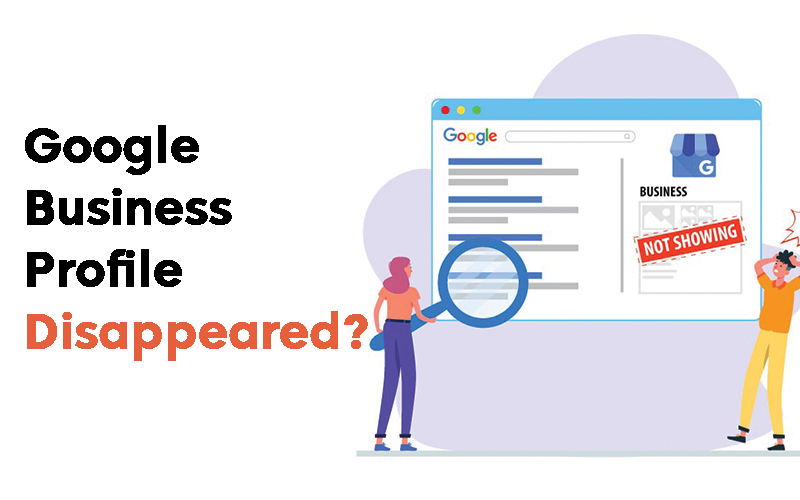 If your Google Business Profile disappeared from Google Maps or Search overnight, you are not alone. Thousands of US business owners face this exact problem every month and the number jumped significantly after the April and May 2026 algorithmic suspension waves.
In this guide, we explain exactly why your Google My Business listing disappeared, how to diagnose the cause, and what steps to take to get your business showing on Google Maps again as fast as possible.
⚠️ April–May 2026 Mass Suspension Wave
On April 27 and May 3, multiple US businesses experienced large-scale suspension waves; if your profile suddenly disappeared recently, this is most likely the reason. Do not create a new listing, instead follow this guide instead.
Why Did My Google Business Profile Disappear?
When business owners ask Why did my Google Business Profile disappear?, there are five possible explanations. Knowing which of them applies to you is critical as every cause has different solutions that need to be considered before taking any further action.
Your Google My Business listing disappeared because Google either suspended it, deleted it, or its visibility was suppressed by an algorithm update. Let's go over each issue in detail.
1. Hard Suspension — Profile Completely Removed
This is the most serious cause. Google completely removes your listing from Search and Maps. You will see a suspension notice in your GBP dashboard. Common triggers: keyword-stuffed business name, virtual office address, duplicate listings at the same address, or policy violations detected by Google's AI.
2. Soft Suspension — Access Lost, Listing May Still Show
Your profile will remain publically, but you will lose the management access, no postings, no editing and no messages. A lesser severe punishment than a complete suspension, but it still requires immediate action. It is usually caused by unusual account activity or recent edits that have triggered the flag.
3. Accidental Deletion
More common than you'd think. This happens when someone with account access deletes the listing by mistake, especially during email migrations, system changes, or when a third-party agency removes the profile. You won't see a Suspended notice the listing is simply gone from your dashboard.
4. Unverified or Reverification Required
If your profile was never properly verified, or if Google requires reverification after an edit (address change, ownership transfer), your business will stop showing on Google Maps until the process is complete. New profiles can take 2–4 weeks to appear consistently after verification.
5. Algorithm Filter / Duplicate Suppression
Google's algorithm may suppress your profile if it detects a stronger, more established listing nearby using the same address, phone number, or business category. This is called duplicate suppression and does not generate a suspension notice your listing simply stops appearing in local pack results.
How to Diagnose Why Your Business Is Not Showing on Google Maps
Before you fix anything, you need to confirm exactly what happened to your profile. Follow this quick 3-step diagnosis.
1. Check Your GBP Dashboard
Log into business.google.com. If you see a Suspended notice you have a suspension. If the listing is completely missing from your dashboard with no notice it was likely deleted. If the listing shows but has a Verification needed banner it needs reverification.
2. Search Google Maps Directly
Open Google Maps in an incognito browser window and search your exact business name + city. If nothing appears at all you likely have a hard suspension or accidental deletion. If a listing appears but it's not yours to manage, a duplicate may exist.
3. Retrieve Your CID Number
CID (Customer ID) numbers are essential in recovery. Check past Google emails (review notifications and update alerts) which often contain your Customer ID; additionally check any website embed codes with Google Maps that could have contained one if relevant; having your CID makes Google support recovery significantly faster.
Step-by-Step Fix: Recover Your Disappeared Google Business Profile
 Once you have diagnosed the cause, follow the appropriate recovery path below. Do not skip steps attempting multiple fixes at once can make recovery significantly harder.
If You Have a Hard Suspension
1. Fix All Violations First
Before filing an appeal, determine and address the issue at hand. Verify: Is your company name Keyword-stuffed? Do you have an online workplace or P.O. Box address? Do you have multiple listings at exactly the same address? Repair every problem prior to submit your appeal. This is before you fix it guarantees rejection.
2. Gather Your Evidence Documents
Prepare: dated exterior signage photos, a utility bill or lease agreement matching your listed address, government-issued business license, and a written explanation of your business operations. Have all files ready before you open Google appeal form you have exactly 60 minutes to upload once the form opens.
3. Submit Your Reinstatement Appeal
Go to Google's reinstatement request form and submit your appeal. Make your case clearly and factually with specific examples — without contesting Google's decision; just demonstrate how your business is legitimate and compliant. Submit it once; don't resubmit an appeal repeatedly.
4. Wait and Monitor
Reinstatement typically takes 3–14 business days. If two weeks pass with no response, post in the Google Business Profile Community forum with your case details. A Google Product Expert can escalate your case.
If Your Profile Was Accidentally Deleted
1. Contact Google Business Support
Go to business.google.com/support and contact support with your CID number. Ask them to reinstate the original listing. If they can reinstate it, your reviews and authority will be preserved.
2. If Reinstatement Is Not Possible
Create a new GBP listing and complete verification. Then contact Google support again with your old CID number and request that reviews from the old listing be transferred to your new one. This preserves your review history.
Soft Suspend vs Hard Suspend: Key Differences
Many business owners confuse the two types of Google suspensions. See our detailed breakdown on soft vs hard GBP suspension for the full picture. Here is a quick comparison to help you identify which situation you are dealing with.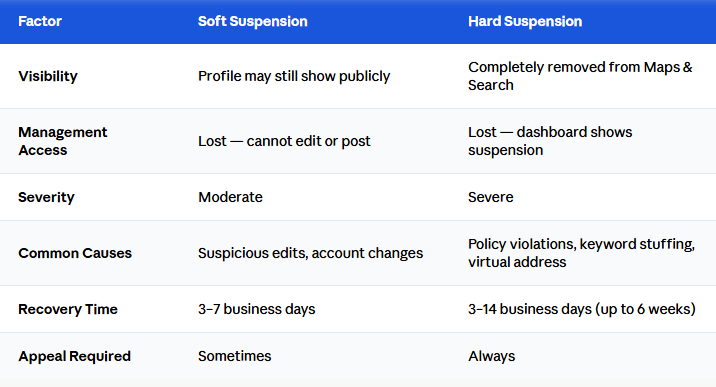
🚫 Critical: What NOT To Do When Your Profile Disappears
- Do NOT create a duplicate listing while your profile is under review this causes a hard suspension that is nearly impossible to reverse
- Do NOT make multiple rapid edits to fix things this can trigger additional algorithm flags
- Do NOT submit the same appeal multiple times repeated identical appeals can result in Google permanently blocking future appeals
- Do NOT panic-delete any information your profile data may be needed for the appeal process
- Do NOT assume the suspension is your fault without investigating first the April/May 2026 wave affected many legitimate businesses
Top Reasons Your Business Is Not Showing on Google Maps in 2026
Even if your profile was not suspended, your business may not be showing on Google Maps for several other reasons. Here are the most common ones in 2026:
1. Profile Not Verified
An unverified Google Business Profile will rarely appear in local search results or Maps. Google keeps it in a holding state until you prove ownership. Complete verification preferably via video verification, which is the default method for new listings in most US regions in 2026.
2. Incomplete Profile Information
Google favors profiles that are complete, accurate, and active. If your profile is missing business hours, photos, a website URL, or a clear business description, it is less likely to rank. Incomplete information signals lower trust to Google's algorithm.
3. Keyword-Stuffed Business Name
Adding keywords like Best GBP Optimization service NYC 24/7 to your business name violates Google's guidelines and is a major suspension trigger in 2026. Use your exact legal business name only. Google's AI now actively detects keyword-stuffed names.
3. Inconsistent NAP Information
NAP stands for Name, Address, Phone number. If your business information is inconsistent across your website, GBP, and other directories, Google loses confidence in your listing and may suppress it from local results. Audit every platform where your business appears.
5.Duplicate Listing at the Same Address
If Google detects two listings at the same address claiming the same business, it may suppress both or choose one to display. Search Google Maps for your business address to check for duplicates, then contact Google Business Profile support to report and merge them.
How to Prevent Your GBP from Disappearing Again
Once your profile is recovered, take these steps to ensure it stays visible and protected going forward.
- Keep your business name exactly as it appears on your signage and legal documents no added keywords
- Ensure your NAP information is 100% consistent across your website, GBP, and all directories
- Complete video verification if you have not already it provides the strongest proof of legitimacy
- Add real, high-quality photos regularly profiles with consistent photo uploads are treated as more active and trustworthy
- Respond to every Google review positive and negative within 48 hours
- Publish Google Posts at least twice per month to signal an active, managed profile
- Never use a virtual office, P.O. Box, or UPS Store as your business address
- Monitor your GBP dashboard weekly for any unauthorized edits or new flags
- Record and save your CID number now you will need it fast if your profile disappears again
💡 Pro Tip: Record Your CID Number Today
Log into your GBP, click on your listing, and check the URL it contains your CID. Save it somewhere safe. If your profile ever disappears without a suspension notice, this number is essential for Google support to locate and recover your listing.
Conclusion
A disappeared Google Business Profile is a serious problem but it is fixable. The key is to diagnose the exact cause before taking any action, fix every underlying issue before submitting an appeal, and avoid common mistakes like creating duplicate listings or submitting multiple appeals.
If your profile disappeared after the April or May 2026 suspension waves, know that you are not alone and recovery is possible with the right approach.
If you need professional help recovering your profile, GMB Guru's certified team handles suspension recovery and profile reinstatement for US businesses every day. Visit our GMB Help & Support page or contact our team to get started.