- What Is a Google Business Profile Description and Why Does It Matter?
- What Should You Actually Include in Your GBP Description?
- Your Core Services or Products
- Your Location or Service Area
- What Makes You Different
- Trust Signals
- How Long Should Your Google Business Profile Description Be?
- Should You Use Keywords in Your GBP Description?
- What Does Google Prohibit in a GBP Description?
- How Does GMB Guru Write GBP Descriptions for Clients?
- Step 1: Business Discovery
- Step 2: Competitive Review
- Step 3: Writing and Compliance Check
- Step 4: Ongoing Refinement
- What Does a Good GBP Description Actually Look Like?
- How Does the Description Fit Into Your Overall GBP Optimization?
- Quick Checklist: Does Your GBP Description Cover Everything?
- People Also Ask
Quick Answer
A perfect Google Business Profile description clearly explains what your business does, who it serves, and what makes it different — in 750 characters or fewer. Use natural language, include your most relevant services and location, and avoid anything that violates Google's content guidelines.
Most businesses treat the GBP description as an afterthought — a couple of generic sentences pasted in and forgotten. That's a missed opportunity. Your Google Business Profile description is often one of the first things a potential customer reads about your business when they find you on Google Search or Google Maps. Get it right, and it builds instant credibility. Get it wrong, and you're invisible or, worse, forgettable.
 At GMB Guru, we work with US businesses every day on exactly this kind of detail — the parts of a Google Business Profile that look small but make a real difference in how you show up and how customers perceive you. In this guide, we'll walk you through exactly how to write a GBP description that works: what to include, what to avoid, how to structure it, and how our team handles this for clients who want it done right the first time.
What Is a Google Business Profile Description and Why Does It Matter?
Your GBP description is a short text field — up to 750 characters — that appears on your Google Business Profile in Search and Maps. It sits below your business name, category, and ratings, and it's one of the few places on your profile where you can write in your own voice and explain what your business actually does.
Google uses this field to help searchers understand whether your business matches what they're looking for. While Google has stated that the description is not a direct ranking factor in the same way that your business category or reviews are, it absolutely influences the human decision-making process. A well-written business bio can be the difference between a customer clicking your website, calling you, or scrolling past to a competitor.
It also matters for completeness. A fully completed profile — including the description — signals to Google that your listing is active, accurate, and trustworthy. According to Google's own guidance on editing your Business Profile, businesses are encouraged to provide a thorough description that gives customers a clear picture of what you offer.
What Should You Actually Include in Your GBP Description?
The short answer: what you do, who you serve, where you serve them, and what makes you worth choosing. Here's how to break that down in practice.
Your Core Services or Products
Lead with what you actually do. If you're a plumber in Dallas, say so clearly. If you're a family dentist offering cosmetic and emergency services in Austin, name those services. Don't be vague. Customers scanning your profile need to know within seconds whether you're relevant to their search.
Your Location or Service Area
Mentioning your city, region, or service area in the description naturally reinforces local relevance. You don't need to keyword-stuff — one or two natural references to your location are enough. This is especially important for service area businesses that don't display a physical address.
What Makes You Different
Years of experience, a specialty niche, a guarantee, a unique process, awards, or a specific type of customer you serve particularly well — these are the details that turn a generic description into a convincing one. Think about what your best customers say about you and reflect that back in your bio.
Trust Signals
Licensing, certifications, how long you've been in business, or the fact that you're locally owned and operated — all of these build confidence quickly. Be specific and accurate. Don't claim certifications you don't hold.
How Long Should Your Google Business Profile Description Be?
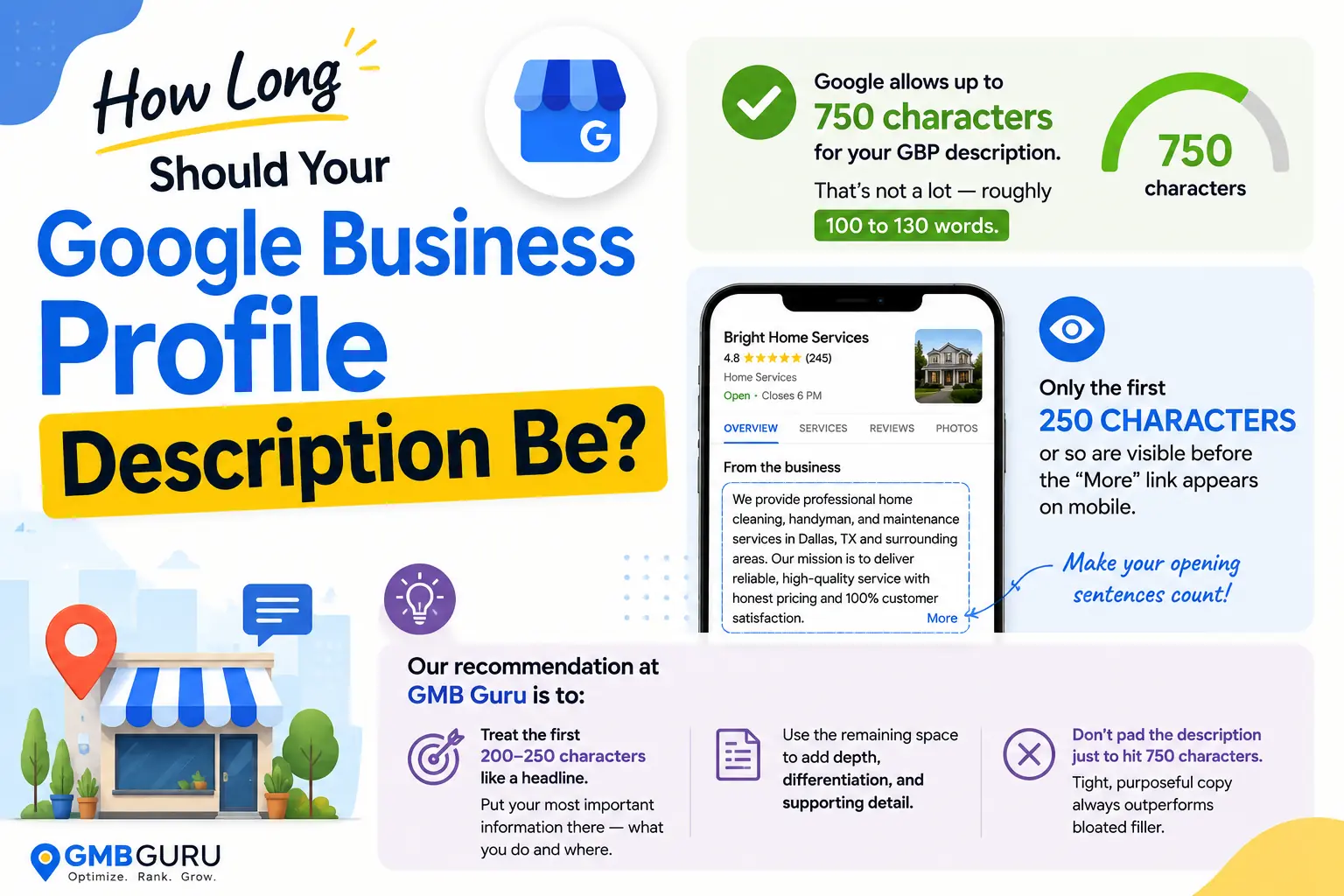
Google allows up to 750 characters for your GBP description. That's not a lot — roughly 100 to 130 words. But here's the important nuance: only the first 250 characters or so are visible before the "More" link appears on mobile. That means your opening sentences carry the most weight.
Our recommendation at GMB Guru is to treat those first 200–250 characters like a headline. Put your most important information there — what you do and where — and use the remaining space to add depth, differentiation, and supporting detail. Don't pad the description just to hit 750 characters. Tight, purposeful copy always outperforms bloated filler.
 Should You Use Keywords in Your GBP Description?
Yes — but naturally, not aggressively. Google has been clear that keyword stuffing in your GBP description violates their policies and can result in your description being removed or your profile flagged. That said, naturally incorporating the terms your customers use to find you is smart and appropriate.
For example, if you run an HVAC company in Phoenix, a description that mentions "air conditioning repair," "heating installation," and "Phoenix homeowners" is perfectly natural — because those are the real words real customers search. You're not stuffing; you're being accurate.
What you should avoid:
- Repeating the same keyword phrase multiple times
- Listing keywords separated by commas without context
- Including keywords that don't genuinely apply to your business
- Using variations and synonyms in an obviously mechanical way
The best GBP descriptions are written for the customer first. When you write clearly and accurately about what you do, the right keywords appear naturally.
What Does Google Prohibit in a GBP Description?
Google's content policies for GBP descriptions are stricter than many business owners realize. Violating them can get your description removed — or in serious cases, contribute to profile issues. Here's what to avoid:
- Promotional language and slogans — phrases like "best prices guaranteed" or "call us today for a free quote" are not permitted in the description field
- URLs or links — you cannot include website addresses in the description
- Misleading content — don't claim to be something you're not, or imply services you don't provide
- Offensive or inappropriate content — this applies to language, claims, or anything that violates Google's broader content policies
- Content that belongs in other fields — your hours, phone number, and address go in their dedicated fields, not in the description
It's worth noting that Google can and does edit or remove descriptions that violate these guidelines. If your description disappears, that's often why. Our team at GMB Guru regularly audits client descriptions for policy compliance as part of our GBP optimization service — because a flagged description is a problem hiding in plain sight.
How Does GMB Guru Write GBP Descriptions for Clients?
When a business comes to us for profile optimization, the description is one of the first things we look at — and one of the most commonly underdone. Here's how our process works.
Step 1: Business Discovery
We start by understanding what the business actually does, who their ideal customer is, what geographic area they serve, and what sets them apart from competitors. We ask the questions most business owners don't think to answer in their description: What problem do you solve? What do your best customers say about working with you? What do you wish more people knew about your business?
Step 2: Competitive Review
We look at how competing businesses in the same category and market are describing themselves. This helps us identify gaps — things the client does well that competitors aren't communicating — and opportunities to stand out in the search results.
Step 3: Writing and Compliance Check
We draft the description with the first 250 characters front-loaded with the most important information, natural keyword integration, and a clear value proposition. Then we run it against Google's content guidelines to confirm it's clean before it goes live. No promotional language, no links, no policy violations.
Step 4: Ongoing Refinement
A GBP description isn't a "set it and forget it" element. As a business evolves — new services, new locations, seasonal focus areas — the description should evolve too. Our ongoing management clients get their descriptions reviewed and updated as part of regular profile maintenance.
If you'd like our team to handle this for your business, you can reach out to us here — we'll take a look at your current profile and tell you exactly what we'd change.
What Does a Good GBP Description Actually Look Like?
Let's make this concrete. Here's the difference between a weak description and a strong one — using a fictional example of a plumbing company in Denver.
Weak description:
"We are a plumbing company. We offer plumbing services. We have been in business for many years. Call us for all your plumbing needs. Best plumbers in Denver. Plumbing repairs, installations, and more."
This description repeats the word "plumbing" without purpose, tells the customer nothing specific, and reads like keyword stuffing even if that wasn't the intent. It would likely be unremarkable to both customers and Google.
Strong description:
"Rocky Mountain Plumbing has served Denver homeowners and commercial clients since 2008. We specialize in emergency pipe repair, water heater installation, and full bathroom remodels — available 24/7 with licensed, insured technicians. Locally owned and committed to transparent pricing, we serve Denver, Lakewood, Aurora, and the surrounding metro area."
This version is specific, trust-building, locally relevant, and written for a real human reader. It naturally includes service terms and location references without forcing them.
How Does the Description Fit Into Your Overall GBP Optimization?
Your GBP description doesn't work in isolation. It's one element of a complete profile — and a complete, consistent profile is what actually drives visibility and customer action. The description supports your category selection, reinforces your services section, and complements your photos and reviews to form a cohesive first impression.
If you haven't reviewed your entire profile recently, our Google Business Profile audit checklist walks you through every element worth evaluating. And if you want to understand how the description fits into the broader ranking picture, our guide on Google Maps ranking factors in 2026 is worth reading alongside this one.
For businesses that want their entire profile handled — description, categories, services, photos, posts, and ongoing management — our team offers full-service optimization. You can explore what that looks like at our GMB optimization service page.
Quick Checklist: Does Your GBP Description Cover Everything?
Before you publish or update your business bio, run through this checklist:
- ✅ Does the first 250 characters clearly state what you do and where?
- ✅ Have you included your primary services or products?
- ✅ Is your city, region, or service area mentioned naturally?
- ✅ Have you included at least one specific differentiator — experience, specialty, guarantee, or niche?
- ✅ Is the description written in clear, natural language — not keyword-stuffed?
- ✅ Does it avoid promotional language, URLs, and phone numbers?
- ✅ Is it under 750 characters?
- ✅ Have you proofread it for spelling and grammar?
- ✅ Does it reflect your current services and business accurately?
If you're checking every box, you're ahead of most businesses on Google. If some boxes are empty, that's exactly where to start. And if you'd rather have professionals handle it — including the research, writing, compliance review, and ongoing updates — that's what we do at GMB Guru. Book a free profile audit and we'll show you what your current description is missing and how to fix it.
For a broader look at how your description fits into your full optimization strategy, our complete guide on how to optimize your Google Business Profile covers every major element from top to bottom.
People Also Ask
- Does the Google Business Profile description affect my local rankings?
- How often should I update my Google Business Profile description?
- Can I include my phone number or website in my GBP description?
- Why did my Google Business Profile description disappear?
- What is the difference between the GBP description and the business category?
- Can I write my GBP description in a language other than English?
People Also Ask
See the FAQ section below for detailed answers to these questions.