How to Recover a suspension Google Business Profile: The Complete 2026 Guide
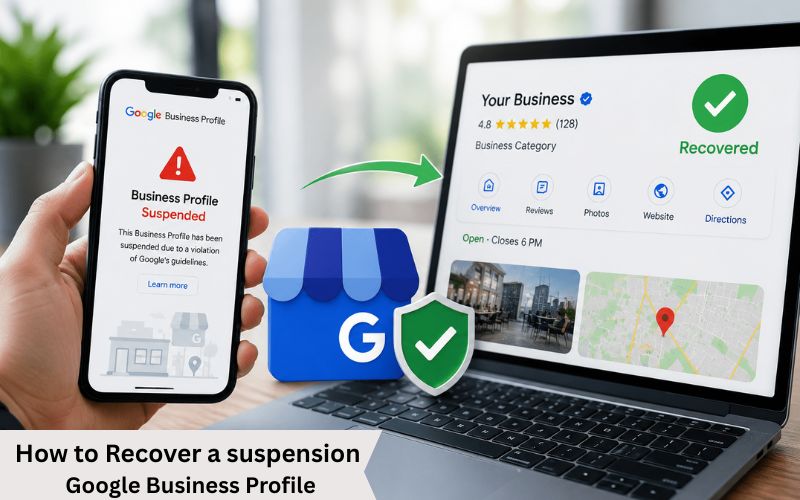 If your Google Business Profile (GBP) formerly known as Google My Business (GMB) has been suspended, you already know the damage it causes. Your business disappears from Google Maps and Search, phone calls stop coming in, and potential customers simply cannot find you.
The good news? A suspension Google Business Profile can almost always be recovered if you follow the right process. This in-depth guide covers everything you need to know: why GBP suspension happens, what types exist, and precisely what steps to take to get your listing reinstated as fast as possible.
Need professional help? Our team is skilled at reactivating Google Business Profiles. We have successfully recovered 500+ suspended listings across industries. If you want experts to handle the entire process for you, get in touch for a free consultation.
What Is a Google Business Profile Suspension?
A GBP suspension occurs when Google detects a violation real or perceived of its Business Profile Guidelines. When suspended, your listing is either hidden from public search results or stripped of its verified/claimed status, making it nearly invisible to potential customers Service.
The suspension can occur on any business profile, whether authentic or not. Sometimes it is triggered by a competitor filing a false report, a minor policy misstep, or even an algorithm update. Regardless of the cause, acting quickly and correctly is essential to minimizing revenue loss.
Important: Do NOT create a new listing to replace a suspended one. Google will detect duplicate profiles and may suspend the new one as well, making recovery significantly harder.
Major Problems Caused by GBP Suspension
Most business owners realize the seriousness of suspension only after leads stop coming in.
Here’s what usually happens after a Google Business Profile suspension.
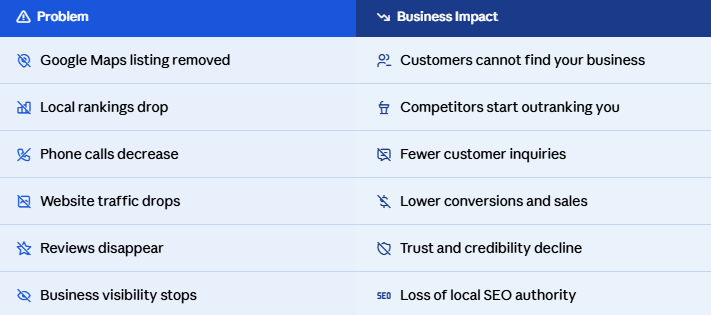
Even a few days of suspension can affect your rankings and lead generation.
Why Google Suspends Business Profiles
Google has become extremely strict regarding fake listings and spam optimization. Even genuine businesses can get suspended if their profile violates Google guidelines.
Below are the most common reasons behind Google Business Profile suspension.
1. Keyword Stuffing in Business Name
This is one of the biggest reasons businesses get suspended.
Many businesses try to manipulate rankings by adding extra keywords into their business name.
Wrong Example:
GMB Suspended Recovery Expert Google Maps Ranking Services
Problems Caused by Keyword Stuffing
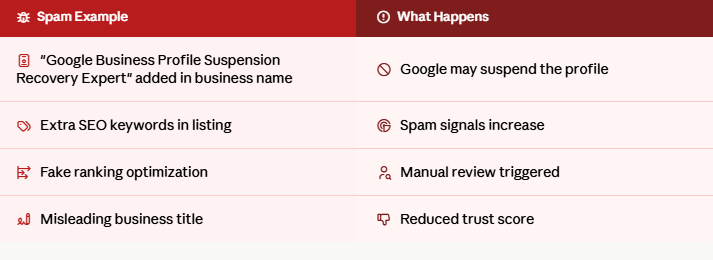
Many businesses temporarily rank higher with keyword stuffing but eventually face suspension.
2. Using Fake Addresses or Virtual Offices
Google only allows legitimate business locations.
Using:
- Virtual offices
- Shared spaces
- Fake addresses
- PO boxes
can trigger hard suspension.
3. Duplicate Google Business Profiles
Some businesses create multiple listings to dominate Google Maps rankings.
Problems Caused by Duplicate Listings
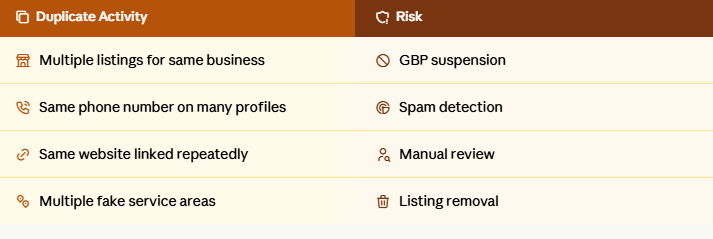
Duplicate profiles confuse both Google and customers.
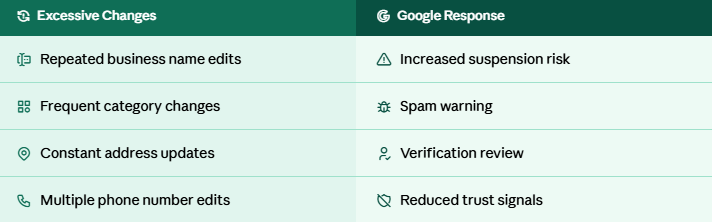
4. Frequent Changes in Business Information
Too much editing of your profile may make your listing look dubious.
Problems Caused by Frequent Edits
 5. Violating Google Business Profile Policies
Google has strict rules regarding:
- Service-area businesses
- Business eligibility
- Fake engagement
- Misleading content
- Spam practices
Violating these guidelines can result in profile suspension or permanent removal.
Signs Your Google Business Profile Is Suspended
Many businesses do not notice suspension immediately.
Common warning signs include:
- Your listing disappears from Google Maps
- Rankings suddenly drop
- Reviews become hidden
- You receive suspension email from Google
- Customers stop finding your business
- Your profile shows Suspended
If you notice these signs, immediate action is necessary.
How to Reinstate Your Suspended Google Business Profile Quickly
Recovering a suspended Google Business Profile requires proper auditing, policy correction, and professional reinstatement handling.
Submitting random appeals without fixing the actual problem usually results in rejection.
At GMB Guru, we follow a proven GBP suspension recovery process.
Step 1 — Identify the Real Suspension Reason
The first step is identifying exactly why Google suspended the listing.
We audit:
- Business name compliance
- Address legitimacy
- Duplicate profiles
- Categories
- Service area setup
- Website trust signals
- Policy violations
Without identifying the root issue, successful reinstatement becomes difficult.
Step 2 — Fix All Violations
Before submitting a reinstatement request, all problems must be corrected.
Common Fixes
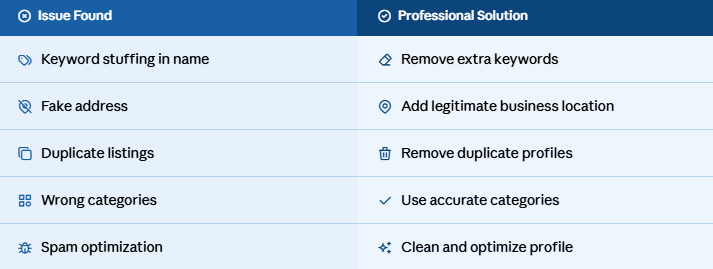
This step significantly improves reinstatement approval chances.
Step 3 — Prepare Verification Documents
Google may require you to provide evidence of your business’s authenticity.
Common Documents Required:
- Business registration
- Utility bills
- GST certificate
- Lease agreement
- Storefront photos
- Business license
- Vehicle branding images
Professional documentation improves trust and speeds up recovery.
Step 4 — Submit Professional Reinstatement Request
After fixing all issues, a detailed reinstatement request is submitted to Google.
A strong appeal includes:
- Clear violation correction explanation
- Compliance proof
- Legitimate business evidence
- Supporting documents
Weak appeals are often rejected.
Common GBP Suspension Recovery Mistakes
Many businesses unintentionally make the situation worse.
Mistakes to Avoid
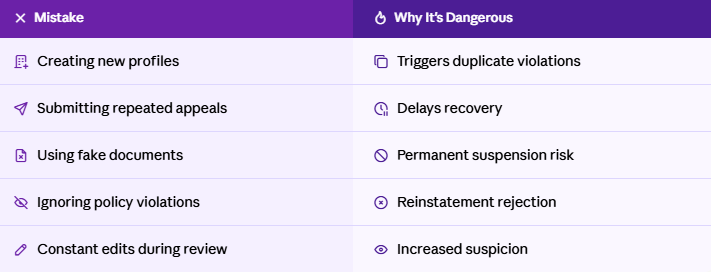
Avoiding these mistakes is extremely important.
Why Professional GBP Suspension Recovery Services Matter
Google’s reinstatement process has become much stricter in 2026, especially for:
- Service-area businesses
- Contractors
- Lawyers
- Realtors
- Multi-location companies
- High-spam industries
Professional recovery services improve success rates and reduce downtime.
Benefits of Professional Google Business Profile Suspension Recovery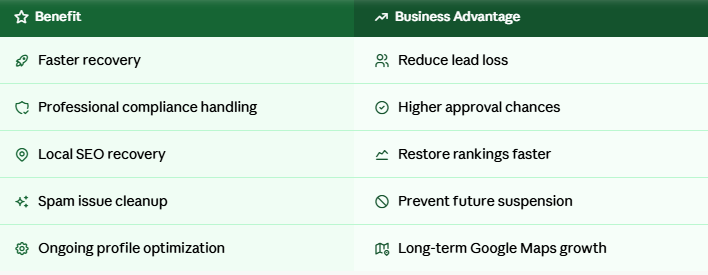 Recover Your Suspended Google Business Profile Today
A suspended Google Business Profile can seriously affect your visibility, rankings, customer trust, and revenue. Every day your listing remains suspended, your competitors gain more local traffic and leads.
At GMB Guru, we provide professional Google Business Profile suspension recovery services designed to restore your listing quickly and safely.
Whether your suspension happened because of:
- Keyword stuffing
- Fake addresses
- Duplicate listings
- Verification issues
- Policy violations
Our experts can identify the issue, fix compliance problems, and help recover your profile professionally.
If your Google Business Profile is suspended, do not risk permanent removal by making costly mistakes.
Contact GMB Guru today for Expert Google Business Profile suspension recovery services and get your business back on Google Maps fast.