- What a Google Business Profile Suspension Actually Means
- Soft Suspension
- Hard Suspension
- Why Google Business Profiles Get Suspended
- The Immediate Steps to Take After Your GBP Gets Suspended
- Step 1: Confirm the Suspension Type
- Step 2: Do NOT Create a New Listing
- Step 3: Audit Your Profile for Violations
- Step 4: Fix All Violations First
- Step 5: Submit a Reinstatement Request
- How GMB Guru Handles Google Business Profile Suspension Recovery
- Our Full Compliance Audit
- Our Documentation and Appeal Strategy
- Post-Reinstatement Hardening
- How Long Does Reinstatement Take?
- Critical Mistakes That Kill Your Reinstatement Chances
- After Reinstatement: How to Protect Your Profile Going Forward
- Keep Your NAP Consistent Everywhere
- Monitor Your Profile for Third-Party Edits
- Stay Within Google's Guidelines at All Times
- Quick-Reference: GBP Suspension Recovery Checklist
- Don't Fight Google Alone — Let GMB Guru Handle Your Reinstatement
How to Recover a Suspended Google Business Profile Fast
 Nothing shuts down a local business's online presence quite like a suspended Google Business Profile. One day your phone is ringing, your Maps listing is pulling in foot traffic, and your reviews are building trust — the next day, you've vanished from Google Search and Maps entirely. If your GBP is suspended, you're not just losing visibility. You're losing real customers, real revenue, and real ground to competitors who are still showing up. The good news? A Google Business Profile suspension is recoverable — but only if you know exactly what you're doing. In this guide, we'll walk you through the entire reinstatement process, explain what likely went wrong, and show you how our team at GMB Guru gets suspended profiles restored fast, often within days.
What a Google Business Profile Suspension Actually Means
When Google suspends your Business Profile, it means your listing has been flagged as violating Google's Google Business Profile guidelines. Your profile either becomes completely invisible to searchers or loses key features like the ability to edit information, respond to reviews, or appear in the local 3-pack.
There are two distinct types of suspension you need to understand before you attempt recovery:
Soft Suspension
A soft suspension means your listing is still visible on Google Maps, but you've lost access to manage it. You can't edit your profile, post updates, or respond to reviews. Google essentially locks you out while keeping the shell of your listing live. This type is more common and generally easier to resolve.
Hard Suspension
A hard suspension is far more damaging. Your entire listing is removed from Google Search and Maps. Customers searching for your business by name may not even find you. This typically happens when Google determines there's a serious policy violation — whether or not you intended it. Our clients dealing with hard suspensions often report immediate drops in calls, direction requests, and website traffic. For a deeper breakdown of each type, read our guide on GBP Soft Suspension vs Hard Suspension: How to Fix It.
Why Google Business Profiles Get Suspended
Understanding the cause of your suspension is the single most critical step in the reinstatement process. If you appeal without fixing the underlying issue, Google will deny your request — and repeated failed appeals can make recovery significantly harder.
Here are the most common suspension triggers we see at GMB Guru:
- Keyword stuffing in the business name — Adding city names, descriptors, or services to your business name field (e.g., "Joe's Plumbing Best Plumber Austin TX") violates Google's guidelines.
- Incorrect business address — Using a virtual office, UPS Store mailbox, or an address where your business doesn't physically operate.
- Multiple listings for the same location — Duplicate profiles or creating separate listings for practitioners at the same address without following Google's rules.
- Sudden bulk changes to core profile data — Rapidly changing your business name, address, phone number, or category can trigger algorithmic flags.
- Operating in a high-risk category — Certain niches like locksmiths, garage door repair, and legal services face heightened scrutiny due to widespread abuse.
- Unverified or incorrectly verified listing — Profiles that weren't properly verified or that have verification inconsistencies are vulnerable.
- Third-party edits accepted by Google — Anyone can suggest edits to your listing. If Google accepts an incorrect suggestion, it can inadvertently trigger a flag.
Want the full breakdown of what causes suspensions? Read our detailed article on Why Google Business Profile Gets Suspended & How to Fix It.
The Immediate Steps to Take After Your GBP Gets Suspended
The moment you discover your profile is suspended, the clock starts. Here's what you should do right away — before touching anything on your profile:
Step 1: Confirm the Suspension Type
Log into your Google Business Profile dashboard. If you see a yellow or red banner warning, you have a soft suspension. If your listing has disappeared entirely from Maps and Search, you're likely dealing with a hard suspension. This distinction matters because the recovery path differs for each.
Step 2: Do NOT Create a New Listing
This is the most common mistake business owners make. Creating a duplicate listing while your original is under suspension will compound the problem and make reinstatement far harder. Resist the urge.
Step 3: Audit Your Profile for Violations
Before filing an appeal, go through every field of your profile with a critical eye. Check your business name for added keywords. Verify that your address is accurate and legitimate. Confirm your business category reflects your primary service. Review your website URL, hours, and description for anything that might conflict with Google's policies.
Step 4: Fix All Violations First
Do not submit a reinstatement request until every policy issue has been corrected. An appeal submitted over a profile that still contains violations will be denied — and Google takes note of repeated failed attempts.
Step 5: Submit a Reinstatement Request
Once your profile is clean, submit your appeal through the official Google Business Profile reinstatement form. Your appeal should include a clear explanation of what was wrong, what you've fixed, and documentation proving your business legitimacy — such as utility bills, business licenses, or lease agreements showing your verified address.
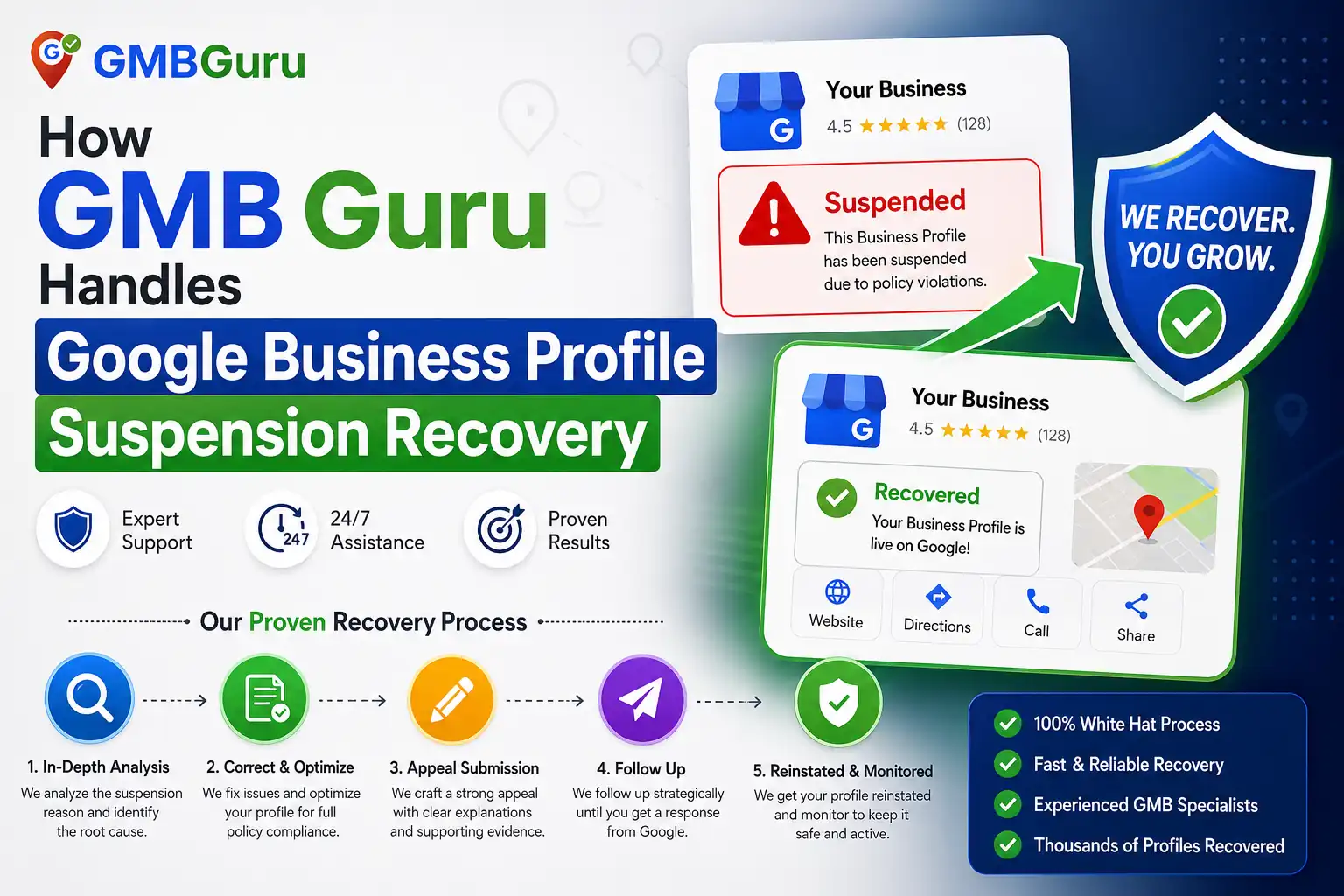 How GMB Guru Handles Google Business Profile Suspension Recovery
At GMB Guru, suspension recovery is one of our most in-demand services — and one of our most consistent wins. We've helped hundreds of US businesses get their listings reinstated, including profiles that had been suspended for months and owners who had already filed multiple failed appeals on their own.
Here's what our reinstatement process looks like:
Our Full Compliance Audit
The first thing our team does is conduct a deep audit of your suspended profile. We're not just looking at the obvious stuff — we examine your entire listing history, any edits made by third parties, your NAP (Name, Address, Phone) consistency across the web, your business category selection, and your verification status. This comprehensive review is what separates a successful appeal from a failed one. Most business owners who try to appeal on their own miss subtle violations that our experienced team catches immediately.
Our Documentation and Appeal Strategy
Our team prepares a documented reinstatement appeal that presents your case clearly and professionally. We compile the right supporting documents — business licenses, utility statements, lease agreements, photos of your physical location — and we frame your appeal in the language Google's review teams respond to. We've learned through experience that how you communicate your case is just as important as the evidence you provide.
Post-Reinstatement Hardening
Getting reinstated is only half the job. Once your profile is live again, we implement a series of protective optimizations to reduce the risk of re-suspension. This includes proper category alignment, name field cleanup, structured description copy, and consistent NAP data across major directories. We also provide ongoing monitoring so you're not caught off guard again.
Our Google Business Profile Suspension Recovery Services are purpose-built for exactly this situation — and our track record speaks for itself.
How Long Does Reinstatement Take?
One of the most common questions we hear from stressed business owners is: "How long will this take?" The honest answer is — it depends on several factors:
- Suspension type: Soft suspensions are generally resolved faster than hard suspensions.
- Quality of your appeal: A well-documented, first-time appeal from a clean profile can be reviewed in as little as 3–7 business days. Poorly prepared appeals or repeat submissions can take weeks or be denied outright.
- Current Google review queue: Google's review team handles massive volume. During peak periods, timelines can stretch to 14–21 days.
- Complexity of the violation: If your profile was suspended due to a systemic issue (like multiple duplicate listings across locations), resolution takes longer.
When our clients work with us through our GMB Reactivation service, we prioritize speed without sacrificing the quality of the appeal — because a denied appeal resets your timeline entirely. For straightforward cases, our clients typically see reinstatement within 5–10 business days of us submitting their appeal.
Critical Mistakes That Kill Your Reinstatement Chances
We've reviewed hundreds of failed appeals, and the same mistakes come up again and again. Avoid these at all costs:
- Submitting multiple appeals at once — Google's system treats this as spam and it can result in a longer review delay or automatic denial.
- Appealing before fixing violations — Google will simply deny the appeal and your violations remain on record.
- Providing insufficient documentation — A vague appeal with no supporting evidence is almost always denied.
- Creating a new listing while appealing — This signals to Google that you're trying to circumvent the suspension rather than resolve it legitimately.
- Using an agency or tool that promises instant reinstatement — No one can guarantee immediate reinstatement. Any service making that claim is misleading you.
For a step-by-step walkthrough of what to do (and what not to do) after your listing goes down, our article on Google Business Profile Suspended? Here's Exactly What to Do is essential reading.
After Reinstatement: How to Protect Your Profile Going Forward
Getting reinstated is a relief — but it's also a wake-up call. Profiles that get suspended once are at elevated risk of being suspended again if the underlying practices don't change. Here's what we recommend to every client post-reinstatement:
Keep Your NAP Consistent Everywhere
Your business Name, Address, and Phone number should be identical across your Google Business Profile, your website, and every local directory listing. Inconsistencies are a major red flag that can trigger re-suspension or suppress your rankings.
Monitor Your Profile for Third-Party Edits
Google allows anyone to suggest edits to your listing. These can be accepted automatically. Set up Google Business Profile notifications so you're alerted any time a change is made — and review your profile at least monthly for unauthorized modifications.
Stay Within Google's Guidelines at All Times
This sounds obvious, but many suspensions come from well-intentioned optimizations that cross the line. Adding a keyword to your business name field, creating a second listing for a second service, or using a new address before verifying it properly — these are all common mistakes. When in doubt, consult Google's official guidelines or work with a certified GBP agency.
Our team provides ongoing profile management through our Google Business Profile Optimization Services — so our clients never have to worry about compliance issues flying under the radar.
Quick-Reference: GBP Suspension Recovery Checklist
Use this checklist to guide your recovery process:
- ✅ Confirm whether you have a soft or hard suspension
- ✅ Do NOT create a new listing
- ✅ Audit your business name for keyword stuffing
- ✅ Verify your address is a legitimate, staffed business location
- ✅ Remove or consolidate any duplicate listings
- ✅ Check that your primary business category is accurate
- ✅ Ensure your NAP data is consistent across all platforms
- ✅ Gather supporting documentation (license, lease, utility bill)
- ✅ Fix all violations before submitting your appeal
- ✅ Submit a single, well-documented reinstatement request
- ✅ Follow up after 7 business days if no response
- ✅ Implement post-reinstatement protections to prevent re-suspension
Don't Fight Google Alone — Let GMB Guru Handle Your Reinstatement
A suspended Google Business Profile is one of the most damaging things that can happen to a local business's online presence. Every day your listing is down is another day your competitors are capturing the customers who would have called you. The reinstatement process requires precision — a misstep can delay recovery by weeks or result in a permanent denial.
At GMB Guru, we've built our entire agency around Google Business Profile expertise. Our certified team knows exactly what Google's review process looks for, how to structure a winning appeal, and how to position your profile for long-term compliance and visibility. We've helped businesses across the US — from single-location shops to multi-location service companies — get their listings back and keep them protected.
If your profile has been suspended and you want it recovered fast and correctly, our dedicated Google Business Profile Suspended service is the fastest path to reinstatement. You can also explore our full suite of recovery and optimization solutions through our GMB Help & Support service.
You don't have to navigate this alone. Reach out to our team today — we'll assess your situation, identify what triggered the suspension, and get to work on getting your listing back where it belongs: at the top of Google Maps.