- What Exactly Is a Service Area Business on Google?
- Why Does Having a Proper SAB Profile Matter for Local Rankings?
- How Do You Set Up a Google Business Profile Without a Storefront?
- Step 1 — Start Your Profile at business.google.com
- Step 2 — Select "I deliver goods and services to my customers"
- Step 3 — Enter But Hide Your Physical Address
- Step 4 — Define Your Service Areas Accurately
- Step 5 — Complete Verification
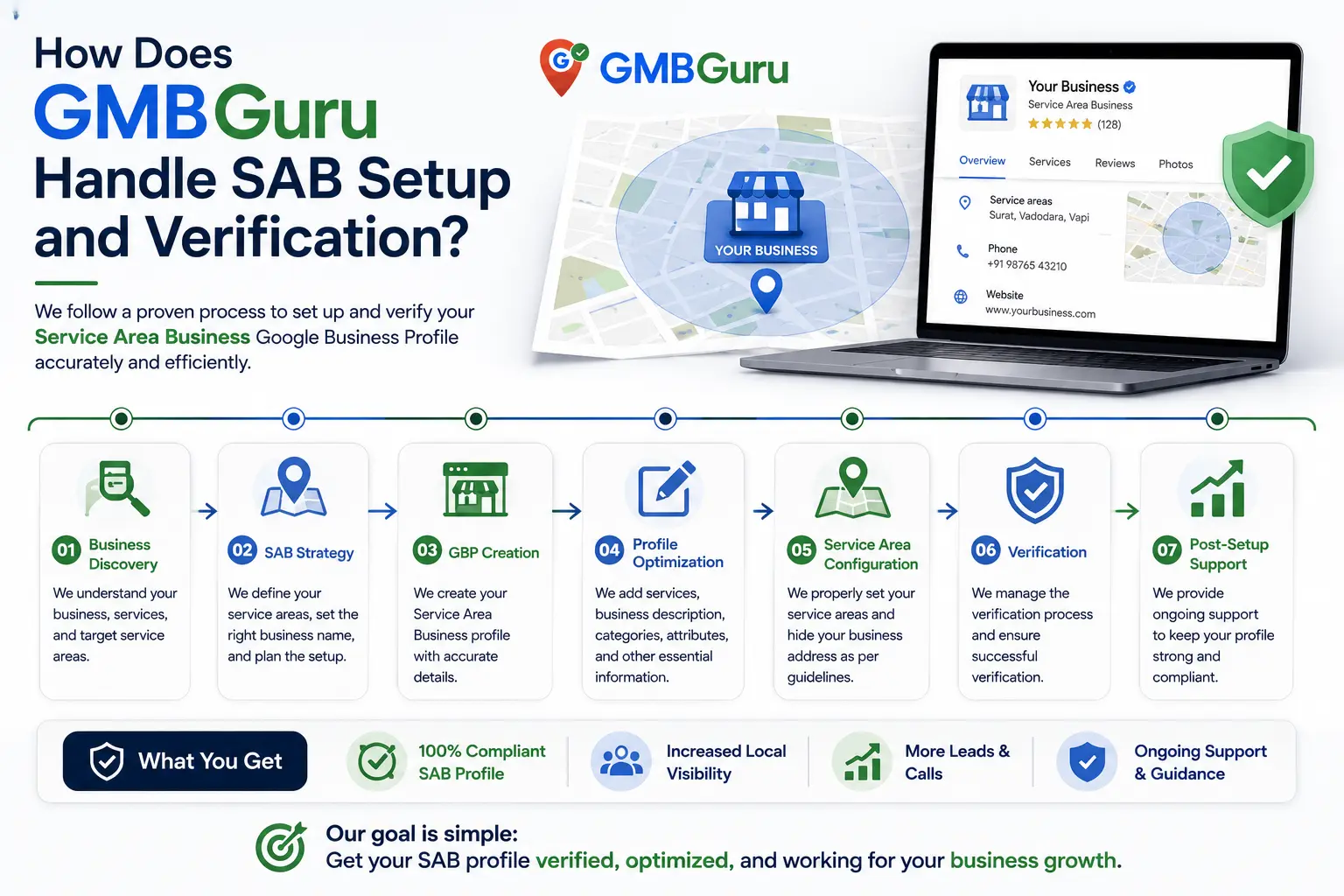
- How Does GMB Guru Handle SAB Setup and Verification?
- What Are the Most Important Optimization Moves for a Service Area Business GBP?
- Build Out Your Services Section Thoroughly
- Post Photos Even Without a Storefront
- Actively Build and Respond to Google Reviews
- Publish Regular GBP Posts
- Maintain NAP Consistency Across the Web
- What Are the Biggest Mistakes Service Area Businesses Make with Their GBP?
- Why Is My Service Area Business Not Ranking on Google Maps?
- How Does GMB Guru's Optimization Process Work for SABs Specifically?
- SAB Google Business Profile Optimization Checklist
- People Also Ask
Quick Answer
A service area business (SAB) can absolutely have a fully optimized Google Business Profile without displaying a physical address — you set your service regions instead, hide your address, and Google will still show your listing in local search and Maps results. The key is knowing how to configure, verify, and optimize your SAB profile correctly so Google treats it as legitimate and ranks it competitively.
If you run a plumbing company, a mobile dog grooming service, a home cleaning business, or any other operation where you go to the customer rather than the other way around, you've probably hit a wall when trying to figure out Google Business Profile. Most tutorials assume you have a storefront with a front door, a lobby, and a street address you're proud to display. But that's not how service area businesses work — and the good news is, Google knows that.
Service area businesses have their own dedicated GBP setup path, their own rules, and their own set of optimization levers. When configured correctly, a no-storefront GMB can rank just as competitively in the local 3-pack and Google Maps as any brick-and-mortar location. At GMB Guru, we work with SABs across the US every day, and this guide walks you through everything you need to know — from initial setup to ongoing optimization — to make your service area profile work as hard as your team does.
 What Exactly Is a Service Area Business on Google?
A service area business is any business that travels to serve customers at their location rather than at a fixed commercial address. According to Google's own guidelines, SABs should set their service areas and hide their business address on their profile if they don't serve customers at their physical location. This is a critical distinction that trips up a lot of business owners.
Common examples of service area businesses include:
- Plumbers, electricians, and HVAC technicians
- Landscapers and lawn care companies
- Mobile pet groomers and dog trainers
- House cleaners and maid services
- Pest control companies
- Roofers and general contractors
- Delivery and courier services
- Personal trainers who travel to clients
What these businesses have in common is that they operate from a home office, a warehouse, or a vehicle — not a retail location. And for years, that ambiguity created real headaches when trying to establish a credible Google presence. Today, Google's SAB designation handles this cleanly, as long as you set it up the right way from the start.
Why Does Having a Proper SAB Profile Matter for Local Rankings?
Your Google Business Profile is the single most visible local marketing asset you own — and for service area businesses, it's often the difference between the phone ringing and complete invisibility on Google Maps. When someone searches "plumber near me" or "house cleaning in [city]," Google's local algorithm surfaces the three most relevant, credible, and proximity-appropriate businesses in what's commonly called the local 3-pack.
Without a properly configured SAB profile, your business either doesn't appear at all or appears with confusing, incomplete information that damages trust. Businesses operating with a displayed residential address they shouldn't be showing — or with service areas that aren't defined — often find themselves underperforming in local results compared to competitors who've gotten their configuration right.
Beyond just showing up, a well-optimized SAB profile communicates legitimacy to both Google and potential customers. It tells Google: "Here's exactly where I operate, here's what I do, and here's the geographic territory I serve." That clarity is a foundational ranking signal for the Google Maps ranking factors that determine who gets found first.
How Do You Set Up a Google Business Profile Without a Storefront?
Setting up a service area business GBP follows the same starting path as any Google Business Profile, but with a few critical divergences at the address and verification stages. Here's the correct flow:
Step 1 — Start Your Profile at business.google.com
Go to business.google.com and sign in with a Google account. Enter your business name exactly as it appears on your website and other directories — consistency matters for NAP (Name, Address, Phone) signals. When asked to select a category, choose the most accurate primary category for your core service. This is one of the most influential ranking decisions you'll make at setup.
Step 2 — Select "I deliver goods and services to my customers"
Google will ask whether customers visit your location or whether you deliver goods and services to them. Select the latter. This flags your profile as a service area business and unlocks the service area input fields. You can define your service area by city, county, zip code, or a radius around a central point.
Step 3 — Enter But Hide Your Physical Address
Google requires a physical address on the backend for verification purposes, but you can — and for most SABs, should — hide it from public display. This is especially important if your address is a home address. Displaying a residential address on your public profile can create trust issues with customers and, in some cases, policy violations if you're not actually serving customers at that location.
Step 4 — Define Your Service Areas Accurately
This is where many SABs make a costly mistake: they either set their service area too broadly (claiming to serve the entire country) or too narrowly (only listing their home city). Google recommends setting service areas that reflect where you actually provide service. Overreaching your real footprint can dilute your relevance signals and hurt, not help, your rankings.
Step 5 — Complete Verification
Verification is where SABs often run into friction. Without a publicly visible storefront, the traditional postcard verification method can be slower, and video verification — which requires showing your equipment, vehicle, or workspace — has become increasingly common for service area businesses. We cover our approach to this in more detail below.
 How Does GMB Guru Handle SAB Setup and Verification?
Our team has worked through the SAB setup process for businesses across dozens of service verticals — from single-operator mobile groomers to multi-truck HVAC companies. We've seen every friction point, every verification wrinkle, and every configuration mistake that causes profiles to underperform or get flagged.
When a service area business comes to us for Google Business Profile optimization, our SAB setup process typically covers:
- Business name and category audit: We verify your primary and secondary categories are the best available match for your services, not just a close approximation.
- Service area mapping: We analyze your actual service territory and configure your GBP service areas to maximize geographic relevance without overreach.
- Address configuration: We confirm your address is correctly entered on the backend for Google's use, and properly hidden from public display where appropriate.
- Verification support: If video verification is required, our team guides you through exactly what Google needs to see — including what to film, in what order, and common rejection reasons to avoid. For persistent verification issues, our video verification service handles the process end-to-end.
- Services and description build-out: We write your business description and services list with keyword-informed language that speaks to local intent.
The goal isn't just to get a profile live — it's to get a profile live that's positioned to rank. Those are two very different outcomes, and the gap between them is usually in the details most business owners overlook during DIY setup.
What Are the Most Important Optimization Moves for a Service Area Business GBP?
Once your SAB profile is live and verified, the real optimization work begins. Here are the areas that move the needle most for service area businesses specifically:
Build Out Your Services Section Thoroughly
The Services section on GBP is one of the most underused features for SABs. Every specific service you offer — not just broad categories — should be listed with its own description. This gives Google additional keyword context about what you do and where, and it helps your profile appear for more specific search queries beyond just "[trade] near me."
Post Photos Even Without a Storefront
Many SABs skip photos because they don't have a building to photograph. Don't. Photos of your team in action, your vehicles, your equipment, completed jobs, and before/after comparisons all signal legitimacy and professionalism to both Google and potential customers. Businesses with more photos on their profiles tend to receive more direction requests and calls — and for SABs, that visual evidence of real work is especially persuasive.
Actively Build and Respond to Google Reviews
Reviews are one of the most powerful ranking and conversion signals for any GBP, but for SABs they carry extra weight — because you have no storefront, photos, or walk-in foot traffic to build trust. Your reviews do a lot of the credibility heavy lifting. A consistent strategy for requesting reviews from satisfied customers, and responding professionally to every review you receive, is non-negotiable. Our guide to getting more Google reviews ethically covers this in depth.
Publish Regular GBP Posts
GBP Posts — updates, offers, and event announcements that appear on your profile — keep your listing fresh and give Google ongoing signals that your business is active. For seasonal service businesses especially (think: lawn care, HVAC, pest control), timely posts tied to seasonal demand can help you appear for exactly the right searches at the right time of year.
Maintain NAP Consistency Across the Web
Even though your address is hidden on your public GBP profile, Google still cross-references your business name, phone number, and service area signals across directories, citation sites, and your own website. Inconsistent business information across these sources creates conflicting signals that can suppress your rankings. Cleaning up and standardizing your citations is a foundational part of what we do for every client — our piece on NAP consistency for local SEO explains exactly why this matters.
What Are the Biggest Mistakes Service Area Businesses Make with Their GBP?
After working with SABs across the US, our team sees the same mistakes come up repeatedly. Here are the ones that cause the most damage:
- Displaying an address they shouldn't: Showing a home address or a virtual office address that doesn't reflect where customers are actually served is a policy violation that can lead to suspension.
- Setting an unrealistically large service area: Claiming to serve 50 cities when you realistically serve 5 dilutes your geographic relevance. Google rewards specificity.
- Leaving the services section empty: This is a significant missed ranking opportunity.
- Ignoring reviews: Not asking for them, not responding to them, or both.
- Keyword-stuffing the business name: Adding city names or service terms to your business name field (e.g., "Mike's Plumbing Dallas Best Prices") is a direct policy violation and a common cause of suspension for SABs.
- Using a P.O. Box as a business address: Google does not accept P.O. Boxes as valid business addresses, even on the backend.
If you've made any of these mistakes and your profile is now suspended, our GBP suspension service can help you understand what happened and what to do next.
Why Is My Service Area Business Not Ranking on Google Maps?
Ranking on Google Maps as an SAB is genuinely harder than ranking as a business with a verified physical address. Google's proximity algorithm historically favors businesses with a confirmed address in the search area. SABs don't get that same geographic anchor point — which means the other ranking signals (reviews, relevance, content, citations, engagement) have to work harder to compensate.
The most common reasons a service area business GBP fails to rank include:
- Service areas defined too broadly, reducing geographic relevance
- Low or no review volume compared to local competitors
- Thin or missing profile content (services, description, posts, photos)
- NAP inconsistencies across citation sources
- No website, or a website with no local SEO signals (no city pages, no schema markup)
- A profile that was never properly verified
The fix isn't a single lever — it's a combination of getting every profile element right and supporting your GBP with a broader local SEO strategy that reinforces your geographic authority in the areas you actually serve.
How Does GMB Guru's Optimization Process Work for SABs Specifically?
When a service area business engages our team, we don't apply a generic GBP optimization template. SABs have fundamentally different needs than storefront businesses, and our process reflects that.
We start with a full profile audit — reviewing every section of your existing GBP for compliance, completeness, and competitive gaps. We look at how your top local competitors are configured, what categories they're using, what their review velocity looks like, and where their profile content is stronger or weaker than yours.
From there, we build and optimize:
- A keyword-informed business description written for both Google relevance and human readability
- A complete services list with individual descriptions for each service you offer
- A photo upload strategy suited to field service businesses
- A GBP post schedule aligned with your peak service seasons and offers
- A review acquisition process your team can actually stick to
- A citation audit and cleanup across the major directory platforms
We also monitor your profile on an ongoing basis — because GBP profiles, especially SABs, can experience edits from third parties, algorithm shifts, and periodic policy reviews that require active management. If you want to see exactly what we'd find on your profile right now, book a free audit and our team will walk you through it.
 SAB Google Business Profile Optimization Checklist
Use this as your reference point for whether your service area business GBP is configured to perform:
- ✅ Business name matches exactly what appears on your website and other directories
- ✅ Correct primary category selected (most specific accurate match)
- ✅ "Service area business" designation correctly applied
- ✅ Physical address entered on backend for verification — hidden from public display if home-based
- ✅ Service areas defined by realistic geographic coverage (cities, counties, or zip codes you actually serve)
- ✅ Profile fully verified through an accepted Google verification method
- ✅ Business description written with relevant service keywords and city/region references
- ✅ All services listed individually with descriptions
- ✅ Business hours accurate and updated
- ✅ Phone number and website URL correct and consistent with other listings
- ✅ Minimum 10+ photos uploaded (team, vehicles, equipment, job photos)
- ✅ At least one GBP post published in the past 7 days
- ✅ Actively collecting and responding to Google reviews
- ✅ NAP consistent across all major citation directories
If you're checking fewer than 10 of these boxes, your profile has real room to improve — and those gaps are almost certainly costing you visibility and customers. For a complete breakdown of GBP optimization across every profile element, our GMB optimization checklist goes deeper on each one.
People Also Ask
- Can a service area business show up on Google Maps without an address?
- How do I set up a Google Business Profile if I don't have a storefront?
- Should I hide my address on my Google Business Profile?
- How many service areas can I add to my Google Business Profile?
- Why is my service area business not showing up in Google Maps results?
- Can I use my home address for a Google Business Profile and then hide it?
People Also Ask
See the FAQ section below for detailed answers to these questions.